
 FA+
FA+ Shop
Shop

Sai2 "Cannot access file" Error [HELP!!]
6 years ago
General
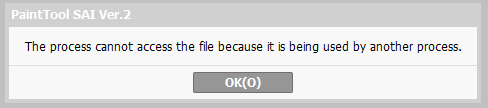
has anyone run into this error message from Sai2 before??
https://i.gyazo.com/f719f61095b19a8.....d086529a3e.png
if i close a file and try to reopen it, it will give me this error message with an additional error in the corner that reads in red "#2 ERROR -Windows function call failed."
im trying to look this up at the same time and someone mentions that it could be a virus or trogan but ive run a quick scan and nothing pops up so far
It usually can resolve itself if i restart my computer but i dont want this to get worse...
heeellppp!! D':
https://i.gyazo.com/f719f61095b19a8.....d086529a3e.png
if i close a file and try to reopen it, it will give me this error message with an additional error in the corner that reads in red "#2 ERROR -Windows function call failed."
im trying to look this up at the same time and someone mentions that it could be a virus or trogan but ive run a quick scan and nothing pops up so far
It usually can resolve itself if i restart my computer but i dont want this to get worse...
heeellppp!! D':

or uhh, what is it under (Png, Jpeg, Gif, PSD, SAI, SAI2,etc?)
Was it saved? if it was saved then do the task manager stuff and just force close all SAI popups
even when I saved it as a PSD before closing the file to see if I can reopen it, it didn't work
it happened to a separate file the day before but because it wasn't the first file I worked on for the day, I was able to open it
I also checked Task Manager to see if I could find anything that would possibly prevent me from opening my files but located nothing
I even tried renaming the file that it was having issues with and it still gives me the same error message :\
You could check the backup/restore file section and see if you can restore it maybe???
i restore it, it opens
i close it and reopen it and it works the first time
i try again to close and reopen it but then it fails and gives me the same error message
So it doesnt seem to be the file thats the problem. im starting to think theres something in the bg thats keeping some part of it open.. somewhere.
im running a full scan rn and hopefully i can find whats eating at my program.
i appreciate the help though! :)
I really doubt it's a virus, it wouldn't affect such a niche thing like this, don't worry!
When renaming the file, change the extension -- so for example "test.sai2" -- rename it to "test.temp" , then back to "test.sai2" ?
i dont know why, but opening the app as admin kind of worked
it will still sometimes flash little red windows errors in the corner but it doesn't prevent me from opening files anymore
i appreciate the help though :)
Glad things worked out in the end! :cheers: