











Views: 22469
Submissions: 403
Favs: 6200

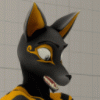
Four-armed Skunktaur from NZ | Registered: June 6, 2019 08:04:39 PM
Oh hey, I'm Juniper, your wholesome neighborhood four-armed skunktaur friend you wish you had from just down your street! I’m from New Zealand, actually but it's great to meet ya!
PMs are open. IRL as of 2024, I’m 43 and married. Juniper is PG13 unless we know each other well
🦨 https://juniper.nz/ 🦨
RP is for friends only.
Trades, Comms: Yeah I guess, but let's talk. *Four-armed hugs you*


#noai - AI datasets can't use my content
Stats
Comments Earned: 1055
Comments Made: 1329
Journals: 20
Comments Made: 1329
Journals: 20
Featured Journal
Howto: Clip Studio Paint 4.x and 5.x on Linux! (G)
3 months agoClip Studio Paint 4 and 5 in Linux
I have Clip Studio Paint 4 and 5 working in Bottles! Still problems with the cog menu in CSP Start (the launcher app), but hey, you can actually manage your assets now!
Untested, but this will probably work with any previous version of CSP too. If it does work for you, please sound off in the comments!
1. Make sure your tablet is working in Linux natively!
* I recommend installing Krita and confirming you have the pressure sensitivity and/or tilt support etc. you expect/desire.
* I have an XP-Pen Innovator 16 and had to install the native XP-Pen drivers to get it to work myself. Your mileage may vary.
2. Download the latest Wine. I'm using 11.0 stable. This involves the command line.
* If you're running a Debian-like Linux such as Ubuntu or Mint, Wine is only up to 9.x in the distro packages, so you'll need to add the official winehq package repositories: How to install Wine 11 in Ubuntu (archive.org)
* If you're using CentOS/Redhat/Arch/Nix you probably know how to do this already, but use the Ubuntu link to get the gist of it.
3. Download the Edge installer for Windows: https://www.microsoft.com/en-us/edg.....ad?form=MA13FJ - you'll need this later.
4. Install Bottles on your computer running Linux.
* I used Mint's Software Manager to get Bottles from Flathub, but you do what you gotta do.
* I also use FlatSeal to grant the Flatpak of Bottles access to folders it doesn't normally have.
5. In Bottles, make a new bottle for CSP. Click the + button, and make a custom win64 bottle with runner
sys-wine-11.0. I called my bottle csp4* in Bottles, Bottles tab > your CSP bottle > Options pane, Settings > Components pane
* dxvk-2.7.1-10-8005016 or newer
* vkd3d-proton-3.0
* dxvk-nvnapi-v0.9.1
6. Set compatibility from the default Windows 10 to Windows 8.1
* in Bottles, Bottles tab > your CSP bottle > Options pane, Settings > Compatibility > Windows Version
7. Run the MS Edge installer in your bottle. From your bottle settings page, click Run Executable and pick the installer you downloaded.
* I haven't had much luck using the dependencies feature of wine/winetricks to get the web views working, so we're doing it manually!
8. Once Edge is installed, run the CSP installer in your bottle.
* Do not login/register your software during installation, only log in once it's all working.
9. Once CSP is installed, close all the CSP apps, close Bottles, re-open Bottles and change your CSP bottle's compatibility to Windows 7 to run CSP and CSP Start
10. Bottles will probably have found the two installed programs. The kebab menu next to each item will let you rename them, and Add to Desktop will actually add these apps to your launcher, not your actual desktop.
* ClipStudio is Clip Studio Launch, the program that lets you work with CSP's cloud feature and manage your downloaded assets.
* ClipStudioPaint is the actual art program.
11. If you have a tablet, CSP Settings > Tablet > Use Mouse Mode - turn this ON.
* note: I've tried a lot of runners, they all tend to break the tablet pressure sensitivity connection when you switch away from a wine app and back again. Luckily, sys-wine-11.0 works great for me.
Tips
a. If you are unable log in or register your software within CSP Start, use CSP. Help > Review / Change License
b. Also check out the Preferences > Performance tab. Consider moving the swap to somewhere on your fastest disk (you'll have to set up a drive for it in Bottles), maybe add more undo levels if that's your thing, and maybe make sure it's using VulkanDNN-YourGPUHere for processing unit.
c. In Bottles, in your bottle settings page > Tools > Legacy Wine Tools > Configuration there is a tab labeled Drives which lets you map different folders on your Linux disk to drive letters! I have F: mounted to my furry art folder! Give that a try. Keep in mind you may need to use FlatSeal to give Bottles more permissions to your folders.
UPGRADING your CSP 4.x TO 5.x
Quickly put, change your bottle to use Windows 8.1, run the installer, it will gladly upgrade. When it's done, switch your bottle back to Windows 7 and it will work as well as it did :)
Please let me know if this helps, or if anything goes differently for you!
Thanks to all who helped me with this, and to all who commented on my previous how to!
FWIW, this worked for me with an AMD Ryzen 5 5600X 6-Core Processor, Linux Mint 22.3 Cinnamon 64-bit, x11 display server, kernel 6.8.0-94-generic, NVIDIA GeForce RTX 3060 with the proprietary NVIDIA drivers 580.126.09
User Profile
Accepting Trades
No Accepting Commissions
No Character Species
Skunktaur
Favorite Games
Towerfall, Deep Rock Galactic
Favorite Gaming Platforms
Steam
Favorite Animals
Skunk, cow, fox, mouse
Favorite Foods & Drinks
Spicy, especially Mexican
Favorite Quote
Noone is where they wanna be in life, but there you are, doing the best you can with what you have!

Contact Information







Advertise |
 Get FA+ |
Site Status |
Get FA+ |
Site Status |
 Merch Store |
Memorial |
Terms of Service |
Privacy |
Code of Conduct |
Upload Policy
Merch Store |
Memorial |
Terms of Service |
Privacy |
Code of Conduct |
Upload Policy
Get FA+ |
Site Status |
Merch Store |
Memorial |
Terms of Service |
Privacy |
Code of Conduct |
Upload Policy

104980 Users online —
3357 guests,
12124 registered
and 89499 other
Limit bot activity to periods with less than 10k registered users online.
© 2005-2026 Frost Dragon Art LLC
Server Time: May 7, 2026 09:32 PM