
 FA+
FA+ Shop
Shop
3351
Views
Views
131
Favorites
Favorites
Category
Artwork (Digital) / All
Species Unspecified / Any
Size 445 x 520
File Size 73 kB
Report this content
★
More from Eskiworks


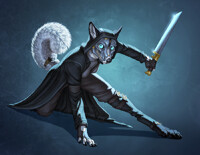


I thought I would make one of my Photoshop files available for download so that fellow Photoshop users could learn how I do things! This file is 1/2 working size, and includes all the working layers. This will give you a clear picture of how I layer things, which layer settings I use, and how I block in my fur texture. While lately I've been playing with matte painting for fur textures, this is a good example of how most of my other work is done.
Click here to download from Dropbox - https://www.dropbox.com/s/grp59dpz6.....ample.psd?dl=0
This file is for learning purposes only! Please do not use this file, or any part of this file in your own work. Feel free to share with other artists and link back to my gallery.
Original painting upload can be found here: http://www.furaffinity.net/view/14396154/
Click here to download from Dropbox - https://www.dropbox.com/s/grp59dpz6.....ample.psd?dl=0
This file is for learning purposes only! Please do not use this file, or any part of this file in your own work. Feel free to share with other artists and link back to my gallery.
Original painting upload can be found here: http://www.furaffinity.net/view/14396154/
Category Artwork (Digital) / All
Species Unspecified / Any
Size 445 x 520px
File Size 73 kB







Thanks so much for posting this up. I really like looking at the layer information and seeing how other artists put the image together. And thanks for trusting the community enough to post up a PSD (something it would be nice if more artists did, even at reduced resolution).


Well, working on the paint layer is just color-picking colors (using the eyedropper tool) from the combination of the layers below (what I'd say is the roughed in painting), and using various brushes to refine things. Painting is sort of a "back and forth till you get it right" process. Use various brushes and brush settings until you get what you want, experiment a lot, etc. I find it useful to use brushes at 100% opacity most of the time, with opacity set to pen pressure. It's easiest to control without getting into pattern where you glaze low opacity colors on forever and ever and ever and ever...
I'm not too sure how much that helps, it's mostly something you have to play with yourself to find what works for you!
I'm not too sure how much that helps, it's mostly something you have to play with yourself to find what works for you!

Aw thank you! =D One of he things that CAN help is using the "smart sharpen" filter at the end when everything is flat! I forget to use it most of the time, but it does occasionally work well to crisp things up a bit. It looks great one fur textures, but not so great on other textures. >_>








HAHA, AT LAST, I CAN SNOOP YOUR PSD FILES! (cue some kind of awful, spooky laughing in the backdrop-- or a belch, whatever's scary)
But seriously, thanks a ton as always for sharing your rad, wonderful process with us, Eski! I always adore seeing how others artists use the badass wizardry that is Photoshop, and I'll be forever baffled at how damn clean your workflow is. Also, your shadows will never stop being breathtaking.
But seriously, thanks a ton as always for sharing your rad, wonderful process with us, Eski! I always adore seeing how others artists use the badass wizardry that is Photoshop, and I'll be forever baffled at how damn clean your workflow is. Also, your shadows will never stop being breathtaking.

Its awesome of you to do this for everyone! Quick question that you might be able to answer.. I've had to use sai exclusively for my artwork anymore as Photoshop refuses to work with windows 8. Do you have any idea how to get Photoshop to work in win 8? The strobing effect makes using PS impossible.




People are free to emulate my process all the like! How an artist does things (layer settings, layer order, different Photoshop tricks) are not something to protect and prevent others from using I don't think. Tracing or referencing from an artists work is another matter, but the how-to of things? Not so much! They are something to share to help others make good art, and to help them learn! I want people to take the process I've provided and use it to make their own art better, perhaps build on it. =)
No, I mean I am totally ok with people using the exact way I do layers, and not modifying it, if it works for them this way! Want to use a multiply layers the way I do? Go for it. Want to lay in complex patterns like the insignias in this piece the way I do? Go for it. If we didn't pass on our artistic process for other artists to learn, there would be very little artistic development in the world! I won't get on anyone case for "copying" how I do things in Photoshop, it's just one method out of so many for using Photoshop. Hope that makes sense! =)


Not any kind of traditional artist, nor will I likely be, but I wanted to thank you for offering this image up specifically. I really liked the pose, the style, and the way the character was seated. (downloaded and saved to an image slideshow program on my computer) To get a glimpse behind the process behind the creation, is an extra treat. Thank you again.
-Kalt
-Kalt

I remember back at RMFC that I asked you on how you do your work so wonderfully. Now I'm learning! :D lol. I'm gonna keep this to help me learn the shading, paint style, texture work, and lighting. Cause those are the hard parts for me when I do anything digital wise. Thanks Nymph!







I would like you to see what this file helped me to produce today: https://fbcdn-sphotos-g-a.akamaihd......46605224_o.png
It's not exactly your level but it's a massive improvement on my own quality and I have you to thank for it. I hope to use your techniques more in the future. I have been wanting to move into more painterly work for a long while now and I believe you've given me the avenue to do so.
It's not exactly your level but it's a massive improvement on my own quality and I have you to thank for it. I hope to use your techniques more in the future. I have been wanting to move into more painterly work for a long while now and I believe you've given me the avenue to do so.

This is kind of a weird question, and I am sorry if this impolite or inconsiderate to ask, but may we... play with it? I would never upload the file or the image ANYWHERE in ANY version or percentage, but I would feel guilty playing with the artwork if I didn't ask. I was thinking about copying over the sketch layer to a new document and trying to emulate how you went about your process in order to better understand it. Would that be, wrong/weird/make-you-uncomfortable/inconsiderate? I could understand if you had this creeping sensation of someone, somewhere, 'messing up' your art, even if you had the originals.
I feel kind of vulnerable asking this question, so I hope you take into consideration why I'm asking and realize I'm asking in the most polite and respectful way possible. C:
/has horrible anxiety
I feel kind of vulnerable asking this question, so I hope you take into consideration why I'm asking and realize I'm asking in the most polite and respectful way possible. C:
/has horrible anxiety

It kinda serves two purposes! The first is to get that reddish tint to the edge of every shadow, just before the shadow core itself. When light hits the very edge of something, just before it drops into shadow and light no longer passes over a surface, red light becomes the most visible. So it's a nice little trick to get a little more believability and depth!
The other reason is that is tends to warm up and deepend the shadows, and I tend to put my shadows in light and cool as a medium to start with. The red multiply layer kind of enrichens those colors already there.
The other reason is that is tends to warm up and deepend the shadows, and I tend to put my shadows in light and cool as a medium to start with. The red multiply layer kind of enrichens those colors already there.



Comments