
 FA+
FA+ Shop
Shop
3127
Views
Views
64
Favorites
Favorites
Category
All / Hyper
Species Exotic (Other)
Size 1280 x 1280
File Size 1.16 MB
Report this content
More from 9-puzzle



You know, just sitting on a peach, nothing out of the ordinary here.
So I decided to try something different, I used the paintbrush tool in MS-Paint 7.0, specifically the oil brush.
It's flawed, boy howdy is it flawed, but it was a matter of doing something different. And what better thing to test that with that a Pikmin?
So I decided to try something different, I used the paintbrush tool in MS-Paint 7.0, specifically the oil brush.
It's flawed, boy howdy is it flawed, but it was a matter of doing something different. And what better thing to test that with that a Pikmin?
Category All / Hyper
Species Exotic (Other)
Size 1280 x 1280px
File Size 1.16 MB

Hoho, I need to pay more attention when I am on fa's front page |B
But oy, even so, I think you did a very nice job with it! I saw something done the other day done in paint 7, done in the style of an oil painting (here if interested) that still had the obvious windows 7 paint quirkiness to it, but still came out very impressively, I think with some more practice, you could def get the hang of controlling it
But oy, even so, I think you did a very nice job with it! I saw something done the other day done in paint 7, done in the style of an oil painting (here if interested) that still had the obvious windows 7 paint quirkiness to it, but still came out very impressively, I think with some more practice, you could def get the hang of controlling it


So you tried a digital painting approach with MSPaint 7 for a change? Very interesting.
Yeah, the tools provided in MS Paint for painting, the brushes are a little wonky aren't they? But they do enable you to do things like colour blending, texturing, anti-aliasing.
This sort of digital painting isn't my strongsuit either, but there's plenty of free software to further explore this territory like Paint.net or GIMP.
You might actually really like Paint.Net, it it basically like MSPaint with added features, you can disable or enable anti-aliasing, it have curve tools but four anchor points to easily click and drag around, easy selection tools like magic wand, etc.
As for the Pikmin himself, someone should lay off the nectar, he's already in full bloom, and full moon. :P
Yeah, the tools provided in MS Paint for painting, the brushes are a little wonky aren't they? But they do enable you to do things like colour blending, texturing, anti-aliasing.
This sort of digital painting isn't my strongsuit either, but there's plenty of free software to further explore this territory like Paint.net or GIMP.
You might actually really like Paint.Net, it it basically like MSPaint with added features, you can disable or enable anti-aliasing, it have curve tools but four anchor points to easily click and drag around, easy selection tools like magic wand, etc.
As for the Pikmin himself, someone should lay off the nectar, he's already in full bloom, and full moon. :P
Having tried free hand "inking" in 5.0 things like jaggedy thanks to the aliasing, so the brush tools in 7.0 fix that. But boy does it start going crazy...
I may try it, I just hate how some sites have 8,000 download things, I worry about which one to click. Yowwie did link me to it in the journal, but I still don't know what thing to click. o3o
What the hell does the magic wand tool do? I try it here: https://pixlr.com/ but I can't figure it out. o3o
Indeed, I guess all those natural sugars went straight to its thighs~
I may try it, I just hate how some sites have 8,000 download things, I worry about which one to click. Yowwie did link me to it in the journal, but I still don't know what thing to click. o3o
What the hell does the magic wand tool do? I try it here: https://pixlr.com/ but I can't figure it out. o3o
Indeed, I guess all those natural sugars went straight to its thighs~
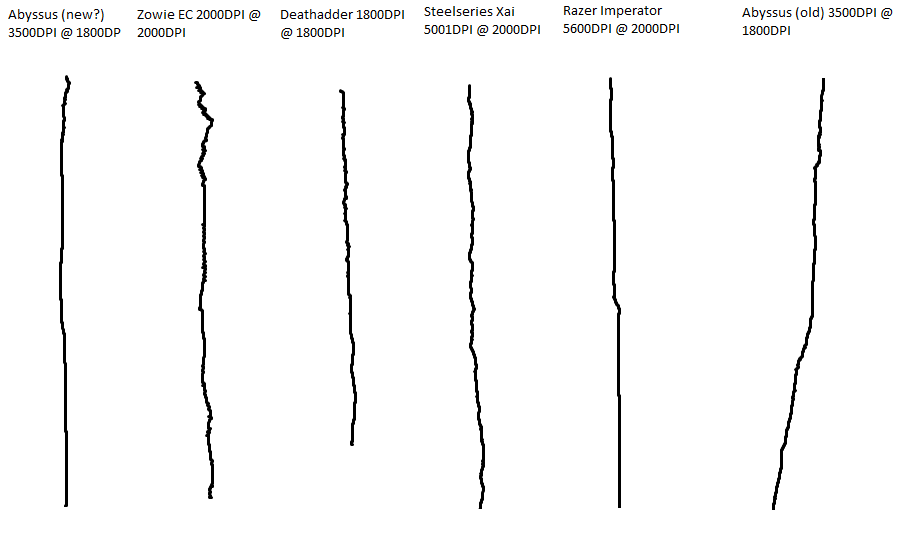
That sounds more like an issue with your mouse. Every mouse can handle curves differently and aren't suited to freehand drawing, when they're focused on things like GUI navigation or gameplay.
http://ariekanarie.nl/wordpress/wp-.....omparison1.png
http://img209.imageshack.us/img209/9720/dpig9.png
Those blasted fake download link adverts definitely suck. That's a big part why I recommend Firefox or Chrome with an adblocker to anyone.
Anyway this is the download from the official website www.getpaint.net.
http://www.dotpdn.com/downloads/pdn.html
"Free Download Now:
paint.net 4.0.5"
The magic wand tool is simple, it selects a group of pixels based on colour similarity.
How similar depends on the threshold you select. A threshold of 0 means you will only select the exact color you clicked, something like 30 begins to select very close colours that only slightly differ in hue, saturation or luminosity. 120 would start picking more distant colours that mostly stay in the same sort of hue, you may use this for gradients. Then it goes up to 255 where it just pretty much picks every pixel on screen.
Plus the advantage of any selection tool that isn't MS Paint's, is it shows a wrapped selection instead of just a box, unlike MS Paint's lasso tool.
http://ariekanarie.nl/wordpress/wp-.....omparison1.png
http://img209.imageshack.us/img209/9720/dpig9.png
Those blasted fake download link adverts definitely suck. That's a big part why I recommend Firefox or Chrome with an adblocker to anyone.
Anyway this is the download from the official website www.getpaint.net.
http://www.dotpdn.com/downloads/pdn.html
"Free Download Now:
paint.net 4.0.5"
The magic wand tool is simple, it selects a group of pixels based on colour similarity.
How similar depends on the threshold you select. A threshold of 0 means you will only select the exact color you clicked, something like 30 begins to select very close colours that only slightly differ in hue, saturation or luminosity. 120 would start picking more distant colours that mostly stay in the same sort of hue, you may use this for gradients. Then it goes up to 255 where it just pretty much picks every pixel on screen.
Plus the advantage of any selection tool that isn't MS Paint's, is it shows a wrapped selection instead of just a box, unlike MS Paint's lasso tool.
It can make more of a difference than you think, but yeah, it's largely because MSPaint doesn't use any sort of stabilisation with its strokes.
All sorts of other graphics applications have options, but they also assume you are using a tablet.
Cool, best of luck using that. If you want any pointers or guidance ask away, maybe using a note.
All sorts of other graphics applications have options, but they also assume you are using a tablet.
Cool, best of luck using that. If you want any pointers or guidance ask away, maybe using a note.







Comments