
 FA+
FA+ Shop
Shop
1219
Views
Views
170
Favorites
Favorites
Category
Artwork (Digital) / Fantasy
Species Unspecified / Any
Size 750 x 615
File Size 360.5 kB
Report this content
More from Lizkay


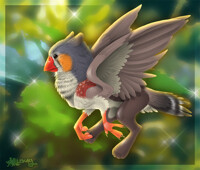


... well...
another gryphon piece, it fits to the others like a series, I had a winter one, a spring one.. now a autumn one, summer is missing.. though that one with Yang in it could stand for it.. blabla...
Mainly used this piece to make some new brushes for myself, used grass, earth, leaf, fur and texture brushes to finish this.. lighting is a bit off, but again, I don't really invested too much time into this ;)
Fox Gryphon in autumn woodside... :heart:
PhotoshopCS2 + Wacom Intuos2 Tablet
FULLVIEW FOR ZE DETAILZ :crazy:
another gryphon piece, it fits to the others like a series, I had a winter one, a spring one.. now a autumn one, summer is missing.. though that one with Yang in it could stand for it.. blabla...
Mainly used this piece to make some new brushes for myself, used grass, earth, leaf, fur and texture brushes to finish this.. lighting is a bit off, but again, I don't really invested too much time into this ;)
Fox Gryphon in autumn woodside... :heart:
PhotoshopCS2 + Wacom Intuos2 Tablet
FULLVIEW FOR ZE DETAILZ :crazy:
Category Artwork (Digital) / Fantasy
Species Unspecified / Any
Size 750 x 615px
File Size 360.5 kB


Thankies! :D
The water is a painted surface blue/greenish color, nothing more than a form, with a bevel/emboss effect, I play around with the settings there in photoshop until it looks like glossy water, than I give it a layer effect.. screen, overlay, whatever works, and than I add a reflection in a new layer into the water form ;)
The water is a painted surface blue/greenish color, nothing more than a form, with a bevel/emboss effect, I play around with the settings there in photoshop until it looks like glossy water, than I give it a layer effect.. screen, overlay, whatever works, and than I add a reflection in a new layer into the water form ;)





Thanks a bunch!
The water is mainly a painted form, whatever you desire there, in a blue-ish color with a photoshop bevel/emboss effect, I play around with the settings until the light/shading looks like a water surface, than I give it a overlay/screen layer mode so that the ground under the water shines through, I also add a reflection in a new layer over it ;)
The water is mainly a painted form, whatever you desire there, in a blue-ish color with a photoshop bevel/emboss effect, I play around with the settings until the light/shading looks like a water surface, than I give it a overlay/screen layer mode so that the ground under the water shines through, I also add a reflection in a new layer over it ;)












Comments