
 FA+
FA+ Shop
Shop
416
Views
Views
3
Favorites
Favorites
Category
Photography / All
Species Unspecified / Any
Size 960 x 1280
File Size 328.2 kB
Report this content
More from Hikyuuri


Listed in Folders
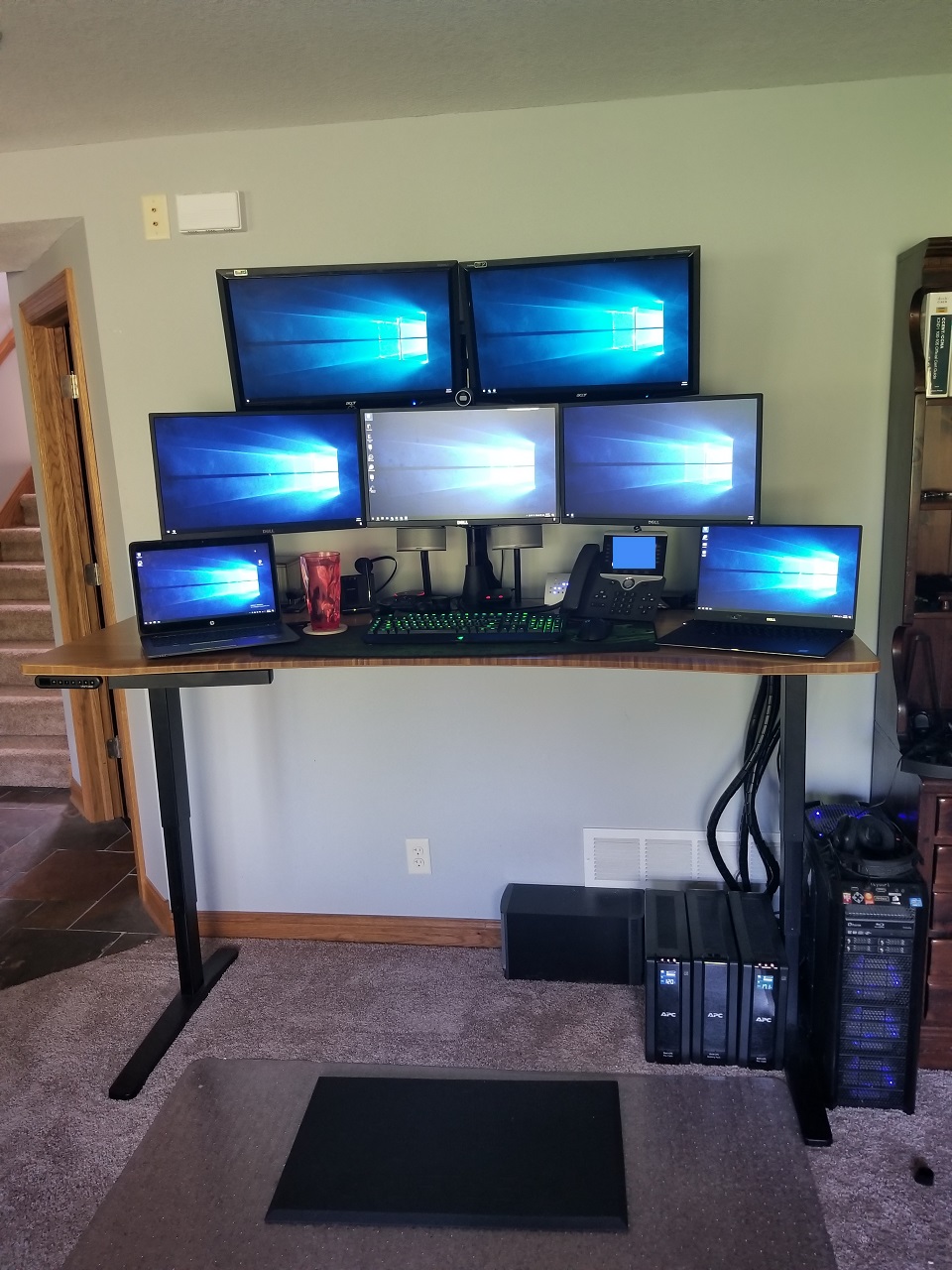

My home office. I work from home full time, so I've had a bit of time to make my home office work for me.
My profession is in Information Technology. A lot of the times, every single one of those screens has something on it, even if it is just for monitoring something. Typically, the laptops are not needed. On occasion, I will use them to render something to keep my desktop free for other tasks. Sometimes I'll take a laptop outside and work from the yard somewhere.
The desk is a motorized sit/stand desk, allowing me to work while standing. This was probably one of the best investments I made for my home office, and HIGHLY recommend it for artists or anyone else who's profession requires extended sitting and usage of a computer.
Believe it or not, but the desktop driving those 5 monitors has a CPU that is now 6 years old, and it is still faster than some of the modern processors. It easily handles whatever I throw at it.
Desktop Specs:
CPU - Intel I7-3820 @ 3.6GHz (no overclock.....yet)
Motherboard - Asus Sabertooth X79
RAM - Corsair 32GB
GPU - EVGA GTX 1080 Classified
2nd GPU - EVGA GTX 580 Classified
OS Hard Drive - Corsair Neutron GTX 512GB SSD (555MBps read, 511MBps write)
Other drives - 4TB combined
Monitors:
Lower 3 - Dell 1080P (should have gone 4K) attached to the GTX 1080
Upper 2 - Acer 1080P 120Hz (3D Ready) attached to the GTX 580 (1080 can only handle 4 monitors, might as well use the 580 for something)
I used to have 3 of the Acer 1080P monitors as my main 3, and could do NVidia's 3D vision across all 3. However, a lightning strike somehow killed one of my GTX580s (replaced with the 1080) and one of the monitors, but nothing else. That's when I got the 3 Dell monitors, and I really wish I would have gone to 4K instead of keeping them at 1080P.
Laptops:
Meh. They are laptops. They are portable and not super powerful.
My profession is in Information Technology. A lot of the times, every single one of those screens has something on it, even if it is just for monitoring something. Typically, the laptops are not needed. On occasion, I will use them to render something to keep my desktop free for other tasks. Sometimes I'll take a laptop outside and work from the yard somewhere.
The desk is a motorized sit/stand desk, allowing me to work while standing. This was probably one of the best investments I made for my home office, and HIGHLY recommend it for artists or anyone else who's profession requires extended sitting and usage of a computer.
Believe it or not, but the desktop driving those 5 monitors has a CPU that is now 6 years old, and it is still faster than some of the modern processors. It easily handles whatever I throw at it.
Desktop Specs:
CPU - Intel I7-3820 @ 3.6GHz (no overclock.....yet)
Motherboard - Asus Sabertooth X79
RAM - Corsair 32GB
GPU - EVGA GTX 1080 Classified
2nd GPU - EVGA GTX 580 Classified
OS Hard Drive - Corsair Neutron GTX 512GB SSD (555MBps read, 511MBps write)
Other drives - 4TB combined
Monitors:
Lower 3 - Dell 1080P (should have gone 4K) attached to the GTX 1080
Upper 2 - Acer 1080P 120Hz (3D Ready) attached to the GTX 580 (1080 can only handle 4 monitors, might as well use the 580 for something)
I used to have 3 of the Acer 1080P monitors as my main 3, and could do NVidia's 3D vision across all 3. However, a lightning strike somehow killed one of my GTX580s (replaced with the 1080) and one of the monitors, but nothing else. That's when I got the 3 Dell monitors, and I really wish I would have gone to 4K instead of keeping them at 1080P.
Laptops:
Meh. They are laptops. They are portable and not super powerful.
Category Photography / All
Species Unspecified / Any
Size 960 x 1280px
File Size 328.2 kB
Listed in Folders


I have an Elitebook as well but it's older, from 2012. I got it from eBay and it appears to have only been used on a dock with an external keyboard so the keyboard hardly has wear and tear. Initially I was looking at the 840p but decided against it and went for used. Your setup's awesome!
What do you render exactly?
What do you render exactly?
When I say "render", it could mean anything. Typically, I'm not doing video rendering or anything like that. If I use one of the side laptops, its usually for a specific work item (one of them is my work laptop, and has some software on it I don't have on my desktop). The most intensive thing the processors would see is the amount of Virtual Machines I run on them.

Yup. If you have multiple GPUs in your computer, you typically can use all of the outputs on both GPUs to the GPU's limit. This might not always be the case though in certain applications (such as SLI or crossfire, which can disable the outputs on the 2nd GPU since its augmenting the first GPU).
In my case, the GTX 1080 can drive 4 monitors simultaneously, and has 5 outputs (3 Displayport, 1 HDMI, and 1 DVI). The GTX 580 can only drive 2 at a time, and only has 2 outputs (both DVI). This means my desktop could handle 6 monitors if I wanted (one more on the 1080). I used to have an HDMI going to my TV from the 1080, but replaced it with a Steam Link when I redid my office (didn't have a "clean" way of hiding the HDMI cable with the desk's new location).
In theory, my desktop could handle 3 GPUs simultaneously. If I put 3 GTX 1080s into my computer, I could drive 12 monitors (4 each).
In my case, the GTX 1080 can drive 4 monitors simultaneously, and has 5 outputs (3 Displayport, 1 HDMI, and 1 DVI). The GTX 580 can only drive 2 at a time, and only has 2 outputs (both DVI). This means my desktop could handle 6 monitors if I wanted (one more on the 1080). I used to have an HDMI going to my TV from the 1080, but replaced it with a Steam Link when I redid my office (didn't have a "clean" way of hiding the HDMI cable with the desk's new location).
In theory, my desktop could handle 3 GPUs simultaneously. If I put 3 GTX 1080s into my computer, I could drive 12 monitors (4 each).
If I span monitors for a game, its just the lower 3 that I use, which are all attached to the GTX 1080. I still get 60FPS when doing this typically.
The upper two monitors are just "aux" monitors. They typically never see game useage. If I am playing a game on all 3 of the lower monitors, I'll have Task Manager and AIDA (system monitoring) on one, and something random on the other (Telegram, Discord, etc).
For work, the typical layout is:
Top left monitor - Network bandwidth monitoring of our primary Datacenter (watching for oddities or downed links)
Top right monitor - Split between Telegram and Task Manager
Bottom Left Monitor - Youtube, Netflix, random web browsing, spreadsheets, etc
Bottom Middle Monitor - Whatever I am actively focusing on working (less neck strain when looking straight ahead).
Bottom Right monitor - work chat application, e-mail, and calendar.
Yes, I could use less monitors, but then I would be constantly switching windows all the time. Its really nice having the desktop real estate when working emergency outages though, as I can keep so many things open and available for reference (watching the network traffic graphs, CLI interfaces into servers or network gear, chats with coworkers, video shares from other colleagues, etc).
The funny thing is, the bottom 3 monitors combined pull less power than ONE of the upper two monitors (bottom 3 are 20W each, upper 2 are 75W each). Eventually, I will replace the upper two to save power, but right now its not a big deal.
The upper two monitors are just "aux" monitors. They typically never see game useage. If I am playing a game on all 3 of the lower monitors, I'll have Task Manager and AIDA (system monitoring) on one, and something random on the other (Telegram, Discord, etc).
For work, the typical layout is:
Top left monitor - Network bandwidth monitoring of our primary Datacenter (watching for oddities or downed links)
Top right monitor - Split between Telegram and Task Manager
Bottom Left Monitor - Youtube, Netflix, random web browsing, spreadsheets, etc
Bottom Middle Monitor - Whatever I am actively focusing on working (less neck strain when looking straight ahead).
Bottom Right monitor - work chat application, e-mail, and calendar.
Yes, I could use less monitors, but then I would be constantly switching windows all the time. Its really nice having the desktop real estate when working emergency outages though, as I can keep so many things open and available for reference (watching the network traffic graphs, CLI interfaces into servers or network gear, chats with coworkers, video shares from other colleagues, etc).
The funny thing is, the bottom 3 monitors combined pull less power than ONE of the upper two monitors (bottom 3 are 20W each, upper 2 are 75W each). Eventually, I will replace the upper two to save power, but right now its not a big deal.
Yeah. Some people still say its massive overkill. I don't deny it. I used to only have 3 monitors, and it was fine. But, when the lightning killed one, and I couldn't get that model any more (I really wanted all 3 monitors to match), I had to get 3 new ones. When I did that, why throw out the old 2 if they still worked? That just seemed wasteful to me.


That's an uplift desk. Nice! I have the 70" version with the same comfort curve and the upgraded height adjuster. Mine is the black top though. Really great desks, I have one at work and one for my home office. I'm a programmer so people think it's weird but going back and forth from sitting and standing has really improved my workflow.

Comments