
 FA+
FA+ Shop
Shop
708
Views
Views
14
Favorites
Favorites
Category
Artwork (Digital) / All
Species Fennec
Size 1304 x 1891
File Size 307.5 kB
Report this content
More from GarryWulf


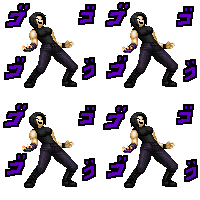
I decided to join the meme and draw one of my characters showing their flexibility, and I thought it would be good to practice a complicated pose like this one.
This time I went with an old character that I have neglected for a while, thinking it would be fitting since he is more agile and nimble than my other characters.
I've also decided to use a different program this time, I made this with Paint. NET to get a bit used to it, and I kind of like it,
It took me an entire day to finish it but I like the result, hopefully I'll be using it more and leave regular MS Paint for pixel art.
Let me know what you think and I'll try to draw something new soon.
Art & Characters @ seriously
This time I went with an old character that I have neglected for a while, thinking it would be fitting since he is more agile and nimble than my other characters.
I've also decided to use a different program this time, I made this with Paint. NET to get a bit used to it, and I kind of like it,
It took me an entire day to finish it but I like the result, hopefully I'll be using it more and leave regular MS Paint for pixel art.
Let me know what you think and I'll try to draw something new soon.
Art & Characters @
 seriously
Category Artwork (Digital) / All
Species Fennec
Size 1304 x 1891px
File Size 307.5 kB


the coloring was very different cuz all I did back then was use the paint bucket tool.
Now I had to make layers for every part I wanted to color differently and then had to cut out the excess that spilled out.
It took me an entire day to finish it but I like how it came out, I just need to learn a better way to shade
Now I had to make layers for every part I wanted to color differently and then had to cut out the excess that spilled out.
It took me an entire day to finish it but I like how it came out, I just need to learn a better way to shade

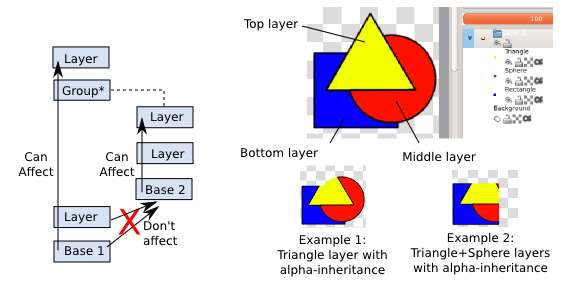
Hmm...I don't know if paint.net has this feature, but stuff like Krita, Clip Studio and Photoshop have things like "layer masks" that let you limit the visibility of a layer to the layer it is attached to. Sort of like this here
https://docs.krita.org/en/_images/K.....ial2-I.1-2.png
I use a system like that to "color out" the main body and then stack layers that are limited to the body on top for details like hair, eyes, secondary colors etc. That may help speed up the shading etc, since you don't have to do a lot of clean up.
https://docs.krita.org/en/_images/K.....ial2-I.1-2.png
I use a system like that to "color out" the main body and then stack layers that are limited to the body on top for details like hair, eyes, secondary colors etc. That may help speed up the shading etc, since you don't have to do a lot of clean up.
Are you sure? I may have used the wrong term, but I'm referring to what the guy in this video here explains at the 71 second mark
https://www.youtube.com/watch?v=uGZ.....tu.be&t=71
Krita (also a free program like paint.net) can do stuff like that
https://www.youtube.com/watch?v=q2HB57GeeVE
https://www.youtube.com/watch?v=uGZ.....tu.be&t=71
Krita (also a free program like paint.net) can do stuff like that
https://www.youtube.com/watch?v=q2HB57GeeVE



Comments