
 FA+
FA+ Shop
Shop


52 submissions


A method for implementing digitigrade legs into ChilloutVR / VRChat that results in realistic bending of joints, despite all systems between Unity and CVR / VRC squarely built for plantigrade legs and absolutely nothing else.
Works wonderfully in fullbody, and in my own test case, works even better for making the default animations look nice than it does making the fullbody better. And now with this methodology, this doesn't require anything other than what Unity provides, and is CVR / VRC whitelisted of course.
If you're having issues with the tutorial and you're not using Blender, the 2.1 version should be more software agnostic. (Use the Unity setup from this guide though, that one is now out of date.)
If you want this, but don't want to do the leg work yourself, I can do it for you. (Pun 100% intended.)
VIDEO VERSION by KaideArt
ホネトリ氏による日本語版 (2) (3)
Advanced Edition For if you understand how this setup works, and wish to optimize things a little farther at the expense of the straightforward simplicity of the primary tutorial.
# Minor note about needing the hip-knee and ankle-foot sections to be nearly or exactly parallel to each other for this to work. This is the sort of oversight you have when you get blinded by how easy it was the first time. Live and learn I guess.
# Re-did Section #1 to hopefully make it more fool proof for explaining what needs to be done. At the loss of the elegance of the original description for doing it.
# Very minor changes to hopefully negate some ambiguity.
# Turns out, Aim Constraints were never necessary at all. On the digi-ankles now there's a Rotation Constraint that's constrained to the planti-hip. Completely fixes any ankle-flipping at impossible angles and leg stretch. Thanks again to Manyblinkinglights for pointing this out.
# Relented and put in a new section about how to solve the "IK lock", with the trade off of it breaking 1:1 foot tracking when bringing the foot back. Ideally, the legs of a given avatar would be made / modified with ideal proportions, but in the case of wanting a specific aesthetic or some other technical reason things have to stay, there's only so much you can do to make a real human leg map to a non human leg. THIS IS NOT TO SAY IT'S NOT FINE 90% OF THE TIME. Just it is a issue that crops up.
Also a section about said ideal proportions.
# Made it less VRChat specific given the sudden mass interest in ChilloutVR, added a note about the difference between CVR and VRC (Spoiler: ChilloutVR requires a toe bone to be set up, VRChat doesn't), and a couple of minor addendum's here and there.
# I was mistaken about the necessity of toe bones for uploading avatars to ChilloutVR, removed that mention as it's straight up false.
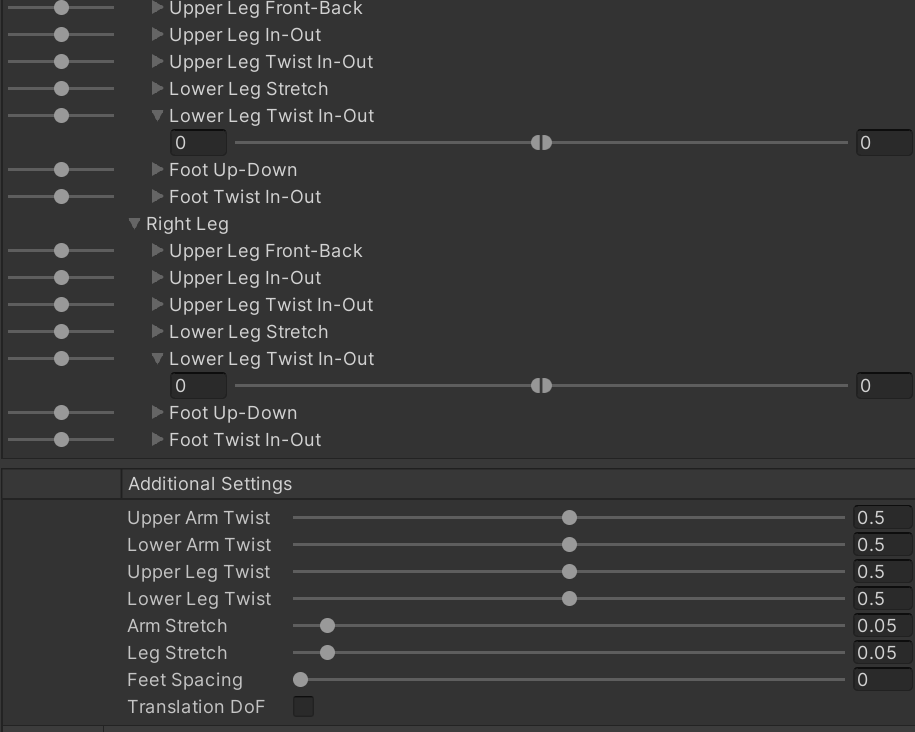
# Unnumbered as this was a very minor change, turns out setting the "Lower Leg Twist In-Out" to 0-0 in CVR caused the foot to not track properly to the foot tracker, as the foots ability to twist is tied to the lower leg's ability to twist.
Works wonderfully in fullbody, and in my own test case, works even better for making the default animations look nice than it does making the fullbody better. And now with this methodology, this doesn't require anything other than what Unity provides, and is CVR / VRC whitelisted of course.
If you're having issues with the tutorial and you're not using Blender, the 2.1 version should be more software agnostic. (Use the Unity setup from this guide though, that one is now out of date.)
If you want this, but don't want to do the leg work yourself, I can do it for you. (Pun 100% intended.)
VIDEO VERSION by KaideArt
ホネトリ氏による日本語版 (2) (3)
Advanced Edition For if you understand how this setup works, and wish to optimize things a little farther at the expense of the straightforward simplicity of the primary tutorial.
# Minor note about needing the hip-knee and ankle-foot sections to be nearly or exactly parallel to each other for this to work. This is the sort of oversight you have when you get blinded by how easy it was the first time. Live and learn I guess.
# Re-did Section #1 to hopefully make it more fool proof for explaining what needs to be done. At the loss of the elegance of the original description for doing it.
# Very minor changes to hopefully negate some ambiguity.
# Turns out, Aim Constraints were never necessary at all. On the digi-ankles now there's a Rotation Constraint that's constrained to the planti-hip. Completely fixes any ankle-flipping at impossible angles and leg stretch. Thanks again to Manyblinkinglights for pointing this out.
# Relented and put in a new section about how to solve the "IK lock", with the trade off of it breaking 1:1 foot tracking when bringing the foot back. Ideally, the legs of a given avatar would be made / modified with ideal proportions, but in the case of wanting a specific aesthetic or some other technical reason things have to stay, there's only so much you can do to make a real human leg map to a non human leg. THIS IS NOT TO SAY IT'S NOT FINE 90% OF THE TIME. Just it is a issue that crops up.
Also a section about said ideal proportions.
# Made it less VRChat specific given the sudden mass interest in ChilloutVR, added a note about the difference between CVR and VRC (Spoiler: ChilloutVR requires a toe bone to be set up, VRChat doesn't), and a couple of minor addendum's here and there.
# I was mistaken about the necessity of toe bones for uploading avatars to ChilloutVR, removed that mention as it's straight up false.
# Unnumbered as this was a very minor change, turns out setting the "Lower Leg Twist In-Out" to 0-0 in CVR caused the foot to not track properly to the foot tracker, as the foots ability to twist is tied to the lower leg's ability to twist.
Category Other / Tutorials
Species Western Dragon
Size 1440 x 9900px
File Size 4.71 MB


Managed to try this out for myself, and here's some results!
https://cdn.discordapp.com/attachme.....7_18-28-39.mp4
Curious if there's a way to lower the amount of bend a knee will do, so I don't have the knees collapse in when I bend my leg.
https://cdn.discordapp.com/attachme.....7_18-28-39.mp4
Curious if there's a way to lower the amount of bend a knee will do, so I don't have the knees collapse in when I bend my leg.
Good stuff!
The only real way to change how much joints will bend is to change the proportions of the leg sections. What exactly the relationship between the leg section lengths and how much they'll bend is something I don't know. I'd guess it would be based on how straight the legs are, and how much the animation in question moves the knees back, the latter of which would obviously be pretty annoying to fix.
The only real way to change how much joints will bend is to change the proportions of the leg sections. What exactly the relationship between the leg section lengths and how much they'll bend is something I don't know. I'd guess it would be based on how straight the legs are, and how much the animation in question moves the knees back, the latter of which would obviously be pretty annoying to fix.
As it turns out, I just found out how to go and fix those "Sinking into the floor" issues the other day. Which you would THINK this would be plastered all over the VRChat documentation and tutorials, but nooo.
In the humanoid rig setup window, you can move and edit the bone positions manually. That's it. Grab the hip bone and move it up, that's all you have to do. Might take a couple tries based on your IRL body proportions vs. the avatars, but with some tweaking that should be fixed.
In the humanoid rig setup window, you can move and edit the bone positions manually. That's it. Grab the hip bone and move it up, that's all you have to do. Might take a couple tries based on your IRL body proportions vs. the avatars, but with some tweaking that should be fixed.

Wouldn't recommend doing that. Mucking about with the weights makes it so the digi-foot won't track the VR tracked planti-foot properly. How much joints bend is just a natural side effect of the very non-human-esque nature of digitigrade legs.
If it's collapsing in on itself, the best course of action is probably making certain leg sections shorter/longer instead.
If it's collapsing in on itself, the best course of action is probably making certain leg sections shorter/longer instead.

Unity likes to do whatever it wants to with joints when you open up the Humanoid configuration thing, which normally entails lifting the arms with A-posed models, but also includes screwing around with the legs if they're not roughly humanoid. Hence the digi-legs being slightly straightened.
There is a button (Under the "Pose" drop down in the Humanoid config. area where we set the bones and such) where you can hit "Reset", which will undo all the things Unity did automatically leaving everything posed as it should be. But this also requires you to manually enforce T-pose with the arms and make sure it's facing the right way and such."
As for things not tracking, don't know what to suggest without knowing more about what's going on.
There is a button (Under the "Pose" drop down in the Humanoid config. area where we set the bones and such) where you can hit "Reset", which will undo all the things Unity did automatically leaving everything posed as it should be. But this also requires you to manually enforce T-pose with the arms and make sure it's facing the right way and such."
As for things not tracking, don't know what to suggest without knowing more about what's going on.

Heya! A contributor to Cats Blender Plugin (https://github.com/GiveMeAllYourCats/cats-blender-plugin/) was able to automate much of these steps and add a new button to the plugin to generate the bones. Would it be okay with you I create 'how to use' button that links to this page? Thanks!
Go for it.
Taking a very quick look at the discussion around the tool, it's generating the plantigrade bones that are needed, but doesn't seem to do anything to the original skeleton, based on how it was described at least. If there's any way to, I'd definitely put a step in that took to parallelize the hip-knee and ankle-foot leg sections and make sure the foot is centered beneath the character before generating the plantigrade bones, as keeping things parallel that need to be parallel is the biggest trip-up I've seen with people trying to do it themselves.
Taking a very quick look at the discussion around the tool, it's generating the plantigrade bones that are needed, but doesn't seem to do anything to the original skeleton, based on how it was described at least. If there's any way to, I'd definitely put a step in that took to parallelize the hip-knee and ankle-foot leg sections and make sure the foot is centered beneath the character before generating the plantigrade bones, as keeping things parallel that need to be parallel is the biggest trip-up I've seen with people trying to do it themselves.


Hey! Amazing guide, it was insanely helpful, however I'm having a problem and I was curious if you might have a solution if you don't mind. It started with the leg bending much too far, so I adjusted the rotation constraint weights to make the lower leg no longer clip into the upper leg, but that's when I realized the problem. Whenever I pass a rotation threshold of about 95 degrees the mesh freaks out. It doesn't matter how far the leg actually moves; I tried different rotation constraint weights as well, always at about 95 degrees it will break like this: (https://i.gyazo.com/3fd1ccae09b55eac8ce6867a8db4b93d.mp4)
If you have any idea as to what's causing it I would love to know, thanks!
If you have any idea as to what's causing it I would love to know, thanks!

Awesome tutorial! However I'm having an issue where my models legs sort of fold up when crouching. Essentially the knee-ankle segment ends up flipping forward resulting in the ankle-foot segment flipping around. I suspect that it has something to do with the relative lengths but I'm not really sure how to go about fixing it.
When that happens the 'Object up' set in 'World up type' isn't doing it's job. Maybe change what part of the planti-leg is set for the 'World up object' if it's currently set correctly? Has to be for the same leg of course.
If the leg either entirely over extends or gets crunched up so far the knee-ankle section gets impossibly flipped past the hip-knee angle, it will cause the ankle-foot sections to potentially flip. Which given they're both scenario's a real leg could never be subjected to, it's the sort of thing that just needs to be tweaked out with changing leg section lengths if it's a major continuous problem.
If the leg either entirely over extends or gets crunched up so far the knee-ankle section gets impossibly flipped past the hip-knee angle, it will cause the ankle-foot sections to potentially flip. Which given they're both scenario's a real leg could never be subjected to, it's the sort of thing that just needs to be tweaked out with changing leg section lengths if it's a major continuous problem.


I am very excited to try this out! I've given it a quick go but I am running in some issues, and I feel like I have missed some info along the way. Unable to see your hierarchy makes it difficult to see if I've been doing it right.
https://imgur.com/a/zvb8YVq
I've made sure my hip-knee and ankle-toe bones are perfectly parallel, and when making the para bones, I read I should delete the ankle-toe bones for them only (and not the digi ones), but later on it seems like it's being used by Unity all the same? Here in the image provided, I seem to be missing something. I've followed the blender part to the best of my ability.
https://imgur.com/a/Z5S03Nm
https://imgur.com/a/zvb8YVq
I've made sure my hip-knee and ankle-toe bones are perfectly parallel, and when making the para bones, I read I should delete the ankle-toe bones for them only (and not the digi ones), but later on it seems like it's being used by Unity all the same? Here in the image provided, I seem to be missing something. I've followed the blender part to the best of my ability.
https://imgur.com/a/Z5S03Nm
If it helps, here's a example hierarchy from one of the models I run, though it really is just "The duplicated (eventual plantigrade) bones start at the hip in the hierarchy." https://i.imgur.com/OnEUuWj.png
While the second screenshot looks like it's mostly how it should be, the first one in Unity appears as though there's no foot bones for the Humanoid rig. You don't need toe bones on the planti-leg, but you do need foot bones as the platigrade foot is where it all culminates to.
While the second screenshot looks like it's mostly how it should be, the first one in Unity appears as though there's no foot bones for the Humanoid rig. You don't need toe bones on the planti-leg, but you do need foot bones as the platigrade foot is where it all culminates to.
Thank you for the quick response! I was missing a foot leg actually.
https://imgur.com/a/zkU2FIk
Foot seems to not be showing up, and confuses it for a toe bone instead. Is this fine?
https://imgur.com/a/zkU2FIk
Foot seems to not be showing up, and confuses it for a toe bone instead. Is this fine?
While you can, you don't need a toe bone, 'cause y'know, digitigrade, but I don't think Unity/VRChat would be happy if you try to use bones in part of the chain in the Humanoid config that aren't actually a part of the bone chain in the actual hierarchy. Remove the toe bones from the Humanoid Config, and assuming you have everything properly parallel, you should be golden.

There's a couple ways to tweak things to try and limit how much the leg sections try to crunch in on themselves:
- Leg section lengths. Long hip-knee bones with comparatively short knee-ankle and ankle-foot bones (common if the model was made with ankle-locked plantigrade in mind originally and was converted) have a tendency to cause that to happen. Changing up how long the the sections are so they're closer to roughly equal makes it less prone to doing that.
- Changing the restrictions in "Lower Leg Stretch" for the Left Leg and Right Leg in the Muscle & Settings tab of the Humanoid config area should make it so the legs are straight up incapable of moving back more than you allow them to. But because there's no real feedback between Muscle Settings and how the constrained digitigrade legs will look in game, this will take some tweaking, and may possibly break things along the way, to tune things to how you like. Also with the understanding that any time we're restricting IK it will make it track whatever it's trying to inversely kinematic itself to worse.
- Leg section lengths. Long hip-knee bones with comparatively short knee-ankle and ankle-foot bones (common if the model was made with ankle-locked plantigrade in mind originally and was converted) have a tendency to cause that to happen. Changing up how long the the sections are so they're closer to roughly equal makes it less prone to doing that.
- Changing the restrictions in "Lower Leg Stretch" for the Left Leg and Right Leg in the Muscle & Settings tab of the Humanoid config area should make it so the legs are straight up incapable of moving back more than you allow them to. But because there's no real feedback between Muscle Settings and how the constrained digitigrade legs will look in game, this will take some tweaking, and may possibly break things along the way, to tune things to how you like. Also with the understanding that any time we're restricting IK it will make it track whatever it's trying to inversely kinematic itself to worse.
When I say change proportions, I mean on the digitigrade legs themselves. The extra plantigrade control bones need to stay proportional to whatever the digitigrade legs may be for it to work, as it's all based on parallelograms being parallel.
And I mean making the lengths of the leg parts closer to equal in length to each other. Instead of having one leg part super long compared to the rest, making sure they're all closer together in length, from what I've seen anyway, makes it less prone to doing weird things.
And I mean making the lengths of the leg parts closer to equal in length to each other. Instead of having one leg part super long compared to the rest, making sure they're all closer together in length, from what I've seen anyway, makes it less prone to doing weird things.
Leg bones need to be connected together as proper chains the hierarchy, but actually being connected together (assuming Blender's head/tail system) on the object doesn't really matter as long as their positions are correct with regards for the relevant bones being parallel. Keeping heads/tails together helps with visualizing things to make certain of the aforementioned parallelism.


I'm massively confused trying to follow the process, maybe you can shine some light on this for me ❤
"We start the process by selecting the leg bones already there, not any extraneous toe bones"
Which ones do you mean by this? By "foot" do you really mean "Toes" as they are called in the Unity human rig (Upper Leg -> Lower Leg -> Foot -> Toes)?
Right now I'm assuming:
hip/hip-knee = Upper Leg
knee/knee-ankle = Lower Leg
ankle/ankle-foot = Foot
foot/foot-??? = Toes
Assuming now that I'll be duplicating my Upper Leg, Lower Leg, Foot and Toes bones; when the guide says "On this new set of unweighted plant-leg bones, delete the ankle-foot bones", I'd delete "Foot", right?
Since the planti bones no longer have any Foot bone, what do I select for Foot and Toes in the Unity rig? Upper Leg and Lower Leg would be my new planti Upper Leg and Lower Leg. Unity says Foot is required so I can't leave it empty, and I can't select the digi Foot bone because then it complains about that bone not being parented to my digi Lower Leg at all. Should I put my digi Toes in the Foot slot maybe? https://imgur.com/a/ySnXjQb
What do I do if my Upper Leg bones (like the Rexoium) point straight up due to VRChat's "Hips and Upper Legs should be 180 degrees to each other" requirement? What do I do if my bones are free-floating and not connected to each other? Do I just roll with it and make my Foot bone straight also? How do I create the parallelogram if both Upper Leg and Foot are straight? They're still parallel, so do I just line up the planti Foot bone with the start of the Toes bone instead?
I've ended up with something like this and I have no idea if I'm even close: https://imgur.com/a/YG0oabr 😥
This looks amazing though and I'm so impressed you managed to figure it out! Thank you for posting it openly! I might have to commission you for some handholding though 😅
"We start the process by selecting the leg bones already there, not any extraneous toe bones"
Which ones do you mean by this? By "foot" do you really mean "Toes" as they are called in the Unity human rig (Upper Leg -> Lower Leg -> Foot -> Toes)?
Right now I'm assuming:
hip/hip-knee = Upper Leg
knee/knee-ankle = Lower Leg
ankle/ankle-foot = Foot
foot/foot-??? = Toes
Assuming now that I'll be duplicating my Upper Leg, Lower Leg, Foot and Toes bones; when the guide says "On this new set of unweighted plant-leg bones, delete the ankle-foot bones", I'd delete "Foot", right?
Since the planti bones no longer have any Foot bone, what do I select for Foot and Toes in the Unity rig? Upper Leg and Lower Leg would be my new planti Upper Leg and Lower Leg. Unity says Foot is required so I can't leave it empty, and I can't select the digi Foot bone because then it complains about that bone not being parented to my digi Lower Leg at all. Should I put my digi Toes in the Foot slot maybe? https://imgur.com/a/ySnXjQb
What do I do if my Upper Leg bones (like the Rexoium) point straight up due to VRChat's "Hips and Upper Legs should be 180 degrees to each other" requirement? What do I do if my bones are free-floating and not connected to each other? Do I just roll with it and make my Foot bone straight also? How do I create the parallelogram if both Upper Leg and Foot are straight? They're still parallel, so do I just line up the planti Foot bone with the start of the Toes bone instead?
I've ended up with something like this and I have no idea if I'm even close: https://imgur.com/a/YG0oabr 😥
This looks amazing though and I'm so impressed you managed to figure it out! Thank you for posting it openly! I might have to commission you for some handholding though 😅
If you managed to get it to work in the end then that's fantastic! But in case anyone else comes along and has the same / similar questions:
"Foot" becomes a little bit weird when talking about digitigrade legs, given the whole "Walking on toes" thing. What would be making contact with the ground in a plantigrade foot gets translated to only the digitigrade toes. But because people like to have things make sense to their own anatomy, the digitigrade toes become the entire 'feet' and the area between the ankle and end-of-foot becomes a weird alien extra limb thing.
You don't need toes mapped in the Humanoid config area, because VRChat doesn't require it and because of the aforementioned "translating plantigrade feet to digitigrade toes" thing.
If you prefer to map things by way of upper leg / lower leg / etc. then how you mapped it there is largely correct. I personally prefer to name things by the actual joint that's being manipulated, as exactly what is 'lower leg' and such can get a bit ambiguous, and I'm usually manipulating bone rotations, not entire lengths of bone. Except for 'feet', because I'm usually more concerned with the entire thing making contact with the ground than just the joint itself.
When you delete the ankle-foot section, this is on the digitigrade leg, which means the digitigrade toes become the plantigrade foot. The plantigrade legs have, in its most basic configuration, one less bone down its length than the digitigrade legs.
You can safely ignore VRChat whining about hip bone rotation. It's basically guaranteed you will have hip bones rotated in a way it doesn't like, but it will upload and work just fine in game.
I will say about the most important thing that needs to be taken into account as far as the character rig goes, is making sure everything that needs to be parallel is actually parallel. Looking at your 2nd screenshot, it doesn't look like the hip-knee and ankle-foot are remotely parallel to each other. You can set up everything in Unity with it like that and it will 'work', but the ankle-foot will be constantly stretching in a rather unpleasant way. It's why I went out of my way to hammer the point home of needing things to be parallel with the v2.2 version of the tutorial.
For a Rex, because that model's tuned to be ankle locked for plantigrade legs, it's basically required to do some mesh and bone editing to make it work well with this kind of set up.
"Foot" becomes a little bit weird when talking about digitigrade legs, given the whole "Walking on toes" thing. What would be making contact with the ground in a plantigrade foot gets translated to only the digitigrade toes. But because people like to have things make sense to their own anatomy, the digitigrade toes become the entire 'feet' and the area between the ankle and end-of-foot becomes a weird alien extra limb thing.
You don't need toes mapped in the Humanoid config area, because VRChat doesn't require it and because of the aforementioned "translating plantigrade feet to digitigrade toes" thing.
If you prefer to map things by way of upper leg / lower leg / etc. then how you mapped it there is largely correct. I personally prefer to name things by the actual joint that's being manipulated, as exactly what is 'lower leg' and such can get a bit ambiguous, and I'm usually manipulating bone rotations, not entire lengths of bone. Except for 'feet', because I'm usually more concerned with the entire thing making contact with the ground than just the joint itself.
When you delete the ankle-foot section, this is on the digitigrade leg, which means the digitigrade toes become the plantigrade foot. The plantigrade legs have, in its most basic configuration, one less bone down its length than the digitigrade legs.
You can safely ignore VRChat whining about hip bone rotation. It's basically guaranteed you will have hip bones rotated in a way it doesn't like, but it will upload and work just fine in game.
I will say about the most important thing that needs to be taken into account as far as the character rig goes, is making sure everything that needs to be parallel is actually parallel. Looking at your 2nd screenshot, it doesn't look like the hip-knee and ankle-foot are remotely parallel to each other. You can set up everything in Unity with it like that and it will 'work', but the ankle-foot will be constantly stretching in a rather unpleasant way. It's why I went out of my way to hammer the point home of needing things to be parallel with the v2.2 version of the tutorial.
For a Rex, because that model's tuned to be ankle locked for plantigrade legs, it's basically required to do some mesh and bone editing to make it work well with this kind of set up.

Hi! Absolutely love the idea and the instructions. Any simple idea what might cause this bend sideways and twist?
https://i.gyazo.com/136822a6f218b3b.....61449c49ea.jpg
https://i.gyazo.com/67d662839b2b328.....56b7fec8a3.jpg
https://i.gyazo.com/136822a6f218b3b.....61449c49ea.jpg
https://i.gyazo.com/67d662839b2b328.....56b7fec8a3.jpg
found and same issue
https://i.gyazo.com/fb89dbe5720b4ae.....aab82f92be.png
https://i.gyazo.com/fb89dbe5720b4ae.....aab82f92be.png
Got it. things weren't "quite" parallel. Now to tweak until the bone positions don't mess up on the feet.
https://i.gyazo.com/d59a79f2e7b20b9.....0cea8c08bb.jpg
https://i.gyazo.com/d59a79f2e7b20b9.....0cea8c08bb.jpg


Sorry to bother you.
I've been trying my best following your tutorial, but I keep running in to the problem with the ankle part stretching out when I add the Parent Constraint to the digi foot.
https://imgur.com/a/LLmFjdv
(ignore the hideous outfit. I just want to make the legs work at the moment.)
It looks normal without the Parent Constraint, but the toes don't stick to the ground whenever I crouch or bend the knees.
Is this the "Indescribable wobble" mentioned in the tutorial? How do I fix this?
I've been trying my best following your tutorial, but I keep running in to the problem with the ankle part stretching out when I add the Parent Constraint to the digi foot.
https://imgur.com/a/LLmFjdv
(ignore the hideous outfit. I just want to make the legs work at the moment.)
It looks normal without the Parent Constraint, but the toes don't stick to the ground whenever I crouch or bend the knees.
Is this the "Indescribable wobble" mentioned in the tutorial? How do I fix this?
That appears as though the area that's not moving properly needs to be weight painted to the digitigrade ankle-foot bones. Though by the look of it there may be some non-parallelism going on in there. Add the missing weights, make sure everything that should be parallel is parallel and you should be fine.
https://imgur.com/a/LLmFjdv
I don't know what's wrong with the weight here. The leg follows the ankle bone nicely in blender.
I tried making the hip-knee bone and ankle bone more parallel using the tip another commenter said, but that alone didn't fix it.
I don't know what's wrong with the weight here. The leg follows the ankle bone nicely in blender.
I tried making the hip-knee bone and ankle bone more parallel using the tip another commenter said, but that alone didn't fix it.
That's good to hear. Was joking with someone earlier about how there's just always hilariously increasing absurd ways to name leg bones that always requires explanation because there's just zero standards.
As for translations, go for it! If it would make things easier, I wouldn't mind assisting with sending the source + answering questions and such.
Whenever you get the chance, if you wanted, send a Note here so we could talk more about that.
As for translations, go for it! If it would make things easier, I wouldn't mind assisting with sending the source + answering questions and such.
Whenever you get the chance, if you wanted, send a Note here so we could talk more about that.
Certainly a very Blender way of doing things. While I'll definitely keep that in mind for when I do conversions, for the tutorial I was trying to keep things as platform agnostic as possible (Which got lost a little with v2.2 admittedly, hence the link to the v2.1 in the description).
I've never used 3DS Max to any extensive degree either, but I can say for my primary 3D software, Carrara, there is no concept of head/tails for bones. There is only a bone object, that when you put bones in a chain in the hierarchy, just connect point-to-point. Orientation of each bone is entirely arbitrary to what you want it to be, unlike Blender where it mandates which direction is 'up' along the bone with wherever the tail is. Plus no concept of bone roll, as each bone is simply a object with its own orientations.
im experimenting with adding one or two more constraints, in order to smooth out the ankle a little, and make it match your foot pivot a small percentage. this should interpolate the angle and improve the appearance when you pivot your ankle forward/down, at a slight cost of FBT accuracy.
Well, my whole end goal was making sure the foot stayed exactly where you put your foot, while making it so the rest of the leg looked good doing it. So I wouldn't recommend doing anything that would reduce tracking performance, as it looks and feels bad when you try to move your foot but the entire leg starts drifting off somewhere else or you bend your foot but it doesn't follow correctly.
Which even ignoring FBT, the main problem is feet sticking to the ground when standing or moving around, whether FBT or not. Anything less than perfect tracking to the foot will cause it to shift and wobble in ways that just looks terrible.
If you get something going that looks good, and maybe even prevents the digitigrade ankle from flipping at impossibly extreme angles, then that's fantastic. But I personally wouldn't make changes that result in reduced foot tracking.
Which even ignoring FBT, the main problem is feet sticking to the ground when standing or moving around, whether FBT or not. Anything less than perfect tracking to the foot will cause it to shift and wobble in ways that just looks terrible.
If you get something going that looks good, and maybe even prevents the digitigrade ankle from flipping at impossibly extreme angles, then that's fantastic. But I personally wouldn't make changes that result in reduced foot tracking.

so I am attempting to get the bones setup and a big thing I question is how does this work with full body issues that VRChat always seems to have if u don't have 180 leg joints flipped? I work in Maya and my pipeline is bringing it through Cat's plugin but this is what the legs KEEP on doing and I'm just at a loss what to do about it XD https://gyazo.com/95faedf78a731ee28618ebc8edac7ee2 It keeps bending the planti grade leg joints back behind. You have any suggestions how to fix this? By the way, I have never got full body to work CORRECTLY from exporting straight from Maya XD I always had to hit full body fix in Blender to ever make it work for me.
After just manually posing the joints and then clicking set rest pose, seems to work XD it just bugs me I can't ever make that exactly be the EXACT rotation I done in Maya or be EXACTLY consistent because it relies on me manually rotating "close enough" for every trial I do through the pipeline XD
Never mind?????? Y is it doing this??????? This makes absolutely no sense?? :// https://gyazo.com/d4cc9e7dcb3f59e5d868f7a2e9942cd2 The right leg works just fine, but the left leg is double deforming??????
Constantly. Far too many hours of life wasted on something incredibly stupid forgotten and spending absurd amounts of effort trying to work around it.
Good to see you managed to get it working! Though I can only imagine adding fancy twist bones into the hip-ankle's is only compounding any technical issues getting it all set up.
Good to see you managed to get it working! Though I can only imagine adding fancy twist bones into the hip-ankle's is only compounding any technical issues getting it all set up.
yeah I might be making it more challenging having twist joints but I want a leg to twist like a leg! XD and it just extra fun setting it up with this well constructed tutorial for digi legs :) Thank you for making it, been a lot of help and shown just how to do interesting trick ^-^

ok, followed everything and i'm getting this on the canis https://gyazo.com/7538ef814f2ae2b049ea7024b8fcfda4
It works fine until I run an emmulator or upload it to vrchat then it stretches.
also forgot to add an image of the skeleton as i ahve it currently https://gyazo.com/4ebb5be91b15089371f5e9f347f84c79
It works fine until I run an emmulator or upload it to vrchat then it stretches.
also forgot to add an image of the skeleton as i ahve it currently https://gyazo.com/4ebb5be91b15089371f5e9f347f84c79
I'm really not sure what would cause them to stretch out like that.
Did you clear the Humanoid config and start over? If not, or even if you did, do that and set up the bones / muscle settings again. After that, remove all of the constraints and put them in again, making sure to reset any rotations along the way.
Did you clear the Humanoid config and start over? If not, or even if you did, do that and set up the bones / muscle settings again. After that, remove all of the constraints and put them in again, making sure to reset any rotations along the way.

thank you for such a lifesaving tutorial <3
i was wondering if you had any idea of what's going on here, i can't wrap my brain around it LOL https://imgur.com/a/Fykszph
only thing i can think is maybe i didn't get things perfectly parallel with each other but i'm not sure why there's so much floating/squashing/twisting going on.... i properly set up the constraints afaik and turned off lower leg rotation too so i'm not sure :S
any help would be appreciated, thank you in advance 💚
i was wondering if you had any idea of what's going on here, i can't wrap my brain around it LOL https://imgur.com/a/Fykszph
only thing i can think is maybe i didn't get things perfectly parallel with each other but i'm not sure why there's so much floating/squashing/twisting going on.... i properly set up the constraints afaik and turned off lower leg rotation too so i'm not sure :S
any help would be appreciated, thank you in advance 💚
From the Blender screenshot, everything looks properly parallel, so I doubt it's that.
It kinda looks like the leg's hip bone might not be being allowed to rotate enough to resolve the foot position without causing the foot to fly above the character like that? Are there any upper leg rotation limits via the Humanoid config in place?
It's generally known the crouching animation is pretty garbage even with "normal" human avatars, so getting that to look good is a major accomplishment even at the best of times.
It kinda looks like the leg's hip bone might not be being allowed to rotate enough to resolve the foot position without causing the foot to fly above the character like that? Are there any upper leg rotation limits via the Humanoid config in place?
It's generally known the crouching animation is pretty garbage even with "normal" human avatars, so getting that to look good is a major accomplishment even at the best of times.
weird... i haven't SET any rotation limits, but that also means i haven't tweaked them at all. i imagine this is what you mean? https://i.imgur.com/obT3hEn.png (i only made the lower leg in-out 0-0)
i managed to fix the floating issue for the standing idle at the very least (for some reason the ankles weren't lined up which was causing some weird problems??????), but there's still floating while walking and crawling, and the leg still crunches/the paw contorts above the head while crawling... i wish vrchat wasn't so finicky LOL
i managed to fix the floating issue for the standing idle at the very least (for some reason the ankles weren't lined up which was causing some weird problems??????), but there's still floating while walking and crawling, and the leg still crunches/the paw contorts above the head while crawling... i wish vrchat wasn't so finicky LOL
A certain amount of that may be just the default crouching and crawling animations not being very good to begin with, I've certainly seen my fair share of funkiness from other avatars with those particular animations, digitigrade or otherwise.
Walking animations as well, for whatever inane reason, get effected by what world you're in. One world, your feet are planting exactly as they should. Another, you're floating a few centimeters above the floor any time you move the stick. Wish VRChat wasn't so finicky either, but short of full custom animation sets or reproportioning characters to be more "Human-like", there's a certain point there's not much that can be done.
Walking animations as well, for whatever inane reason, get effected by what world you're in. One world, your feet are planting exactly as they should. Another, you're floating a few centimeters above the floor any time you move the stick. Wish VRChat wasn't so finicky either, but short of full custom animation sets or reproportioning characters to be more "Human-like", there's a certain point there's not much that can be done.
DARN alright, i'll probably scour around for custom animations to hopefully get it to be less finicky in that case and just try tweaking things until i get a result i'm comfortable with. if all else fails i'll just tolerate a more humanoid leg rig! thank you regardless for your help! :]

This is awesome and I mostly got it right in my first try (i think!)
However,when I walk forward and backwards with my digi legs using VRChat's IK, my hooves now float off the ground. I have not had a chance to test this in full body yet to see how the legs behave.
Here's my bones and hierarchy in Blender. https://i.imgur.com/iz4zK7S.png
Here's how it looks in the Unity rig config (it looks weird! Why is the foot bone not showing?) https://i.imgur.com/PzNbWnY.png
Here's how I configured the legs https://i.imgur.com/WpOrRaF.png
I called the Digi legs the "fake" legs. The planti legs are just called leg etc. The rotation constraints are set up as you instructed and I've tried both parent constraint and rotation constraint on the feet.
The rest of the issues (clipping, etc) I'm able to identify as needing weight paint tweaks.
https://i.imgur.com/TZcXSbs.gif
https://i.imgur.com/YoFNkVb.gif
EDIT: read your comment about different worlds. Going to try in a different world to see if a different world has the same behavior.
However,when I walk forward and backwards with my digi legs using VRChat's IK, my hooves now float off the ground. I have not had a chance to test this in full body yet to see how the legs behave.
Here's my bones and hierarchy in Blender. https://i.imgur.com/iz4zK7S.png
Here's how it looks in the Unity rig config (it looks weird! Why is the foot bone not showing?) https://i.imgur.com/PzNbWnY.png
Here's how I configured the legs https://i.imgur.com/WpOrRaF.png
I called the Digi legs the "fake" legs. The planti legs are just called leg etc. The rotation constraints are set up as you instructed and I've tried both parent constraint and rotation constraint on the feet.
The rest of the issues (clipping, etc) I'm able to identify as needing weight paint tweaks.
https://i.imgur.com/TZcXSbs.gif
https://i.imgur.com/YoFNkVb.gif
EDIT: read your comment about different worlds. Going to try in a different world to see if a different world has the same behavior.
https://i.imgur.com/Ke6XhWF.gif
This world is also showing me what's happening with moving forward/backwards, too.
This world is also showing me what's happening with moving forward/backwards, too.
There's nothing wrong with how you set things up, everything looks correct there. The foot bones are showing up in the Humanoid config (They're the green balls at the end of the red legs), it's just there's no "Head/tail" system in most software, so a single bone usually gets represented by a single point with visible axis.
With the first couple of .gif's with the wooden floor, it's kinda hard to tell given there's no contact shadows, but it looks like the walk cycle is as correct as it usually is in VRChat, it's just it's a little odd (because it was always odd like this) with it only making ground contact right at the end of the cycle each step. It's something I've seen plenty of with most avatars walking around VRChat. Same with the blue one, again because difficult to tell with no shadows, though the walk backwards animation looks straight bad.
I think this might just be another case of VRChat funkiness striking again as a whole. Though I'm starting to wonder if the angles/proportions of the plantigrade legs being particularly far away from human have anything to do with it possibly doing weird things. By design of how that works it shouldn't, but it's something I'll have to investigate at some point.
With the first couple of .gif's with the wooden floor, it's kinda hard to tell given there's no contact shadows, but it looks like the walk cycle is as correct as it usually is in VRChat, it's just it's a little odd (because it was always odd like this) with it only making ground contact right at the end of the cycle each step. It's something I've seen plenty of with most avatars walking around VRChat. Same with the blue one, again because difficult to tell with no shadows, though the walk backwards animation looks straight bad.
I think this might just be another case of VRChat funkiness striking again as a whole. Though I'm starting to wonder if the angles/proportions of the plantigrade legs being particularly far away from human have anything to do with it possibly doing weird things. By design of how that works it shouldn't, but it's something I'll have to investigate at some point.
In theory? Quite likely if you're determined enough. But that's going to make the setup way more difficult than it needs to be, and likely is going to run into a wall where eventually we're going to need FinalIK brought into the mix for plantigrade mode to look remotely decent.
All of this effort for figuring out digitigrade was to try and eliminate locked ankle plantigrade on digitigrade avatars. In a ideal world, everything would be on custom animations and/or the standard animations were more impossibly robust to doing this sort of thing. Which as is, the animation sets are, miraculously, extremely flexible given they way they're designed. As is, I'm pretty happy with how the digitigrade legs tend to look in motion.
Think a large part of this is we're all more observant of how the walk cycles look when trying to get this working, and thus more aware of how jank they always were. It's the jank getting brought to the forefront when doing things like this.
All of this effort for figuring out digitigrade was to try and eliminate locked ankle plantigrade on digitigrade avatars. In a ideal world, everything would be on custom animations and/or the standard animations were more impossibly robust to doing this sort of thing. Which as is, the animation sets are, miraculously, extremely flexible given they way they're designed. As is, I'm pretty happy with how the digitigrade legs tend to look in motion.
Think a large part of this is we're all more observant of how the walk cycles look when trying to get this working, and thus more aware of how jank they always were. It's the jank getting brought to the forefront when doing things like this.


Hi DragonSkyRunner,
I've gotten the basis of this setup working, but I'm running into a pretty bothersome issue. When I move my avatar's feet, it results in some pretty horrific stretching on the toes. How do I fix this?
https://imgur.com/a/4lL857l
I've gotten the basis of this setup working, but I'm running into a pretty bothersome issue. When I move my avatar's feet, it results in some pretty horrific stretching on the toes. How do I fix this?
https://imgur.com/a/4lL857l

Thank you so much for this awesome tutorial! i followed it to the best of my abilities, but my avatar kinda just,,, implodes if it does anything for too long (standing, walking, expressions) https://youtu.be/A-sw6YeHuBk and heres my bones set up https://sta.sh/226azmh9wvlr?edit=1
I'm kinda impressed it's as broken as it is, I mean how?!
My first thought is something's wrong with the rig's set up in the Unity Humanoid area, the hip bone isn't in the proper hip bone slot and such, or maybe some constraints are in the wrong locations/constrained to the wrong things? Beyond that, not sure what to suggest with the whole "imploding" thing. What I can tell you is even after you get that figured out, the legs aren't going to work properly as the plantigrade legs NEED to be properly parallel with the digitigrade legs for it to work. Also, for both the digitigrade leg thing and how Unity's Humanoid setup prefers thing, it'll make life far easier if you have your legs straight forward/back, instead of slightly canted outward like they are now.
My first thought is something's wrong with the rig's set up in the Unity Humanoid area, the hip bone isn't in the proper hip bone slot and such, or maybe some constraints are in the wrong locations/constrained to the wrong things? Beyond that, not sure what to suggest with the whole "imploding" thing. What I can tell you is even after you get that figured out, the legs aren't going to work properly as the plantigrade legs NEED to be properly parallel with the digitigrade legs for it to work. Also, for both the digitigrade leg thing and how Unity's Humanoid setup prefers thing, it'll make life far easier if you have your legs straight forward/back, instead of slightly canted outward like they are now.
Actually, what is whatever the red arrow is pointing at? There's a good chance that existing is what's causing your imploding.
https://i.imgur.com/5M5o0dF.png
https://i.imgur.com/5M5o0dF.png


What do you do if the Planti bones don't show up in Unity? They are visible in Blender but I don't see them in Unity when setting up the rig
https://i.imgur.com/WKEjbmO.jpg
https://i.imgur.com/WKEjbmO.jpg
I seem to be getting weird twisting when adding the constraints. Sorry this video was recorded because I also sent it to someone who made a YouTube video based on your tutorial https://youtu.be/Fc16QJ_vIq8
Ok so I did that instead and when I loaded the model I get this happening with the feet bone. and I did make sure to use Parent constraint on those
https://i.imgur.com/nNJ18Gt.jpg
https://i.imgur.com/nNJ18Gt.jpg

So tried this technique out myself, and I have some notes:
1. Only one extra bone is required, the plantigrade calf. The digitigrade calf can be disconnected from the digitigrade thigh, and the thigh can do double duty as both the plantigrade and digitigrade thighs, since the length of a bone has no actual effect on the way the rig works.
2. The plantigrade thigh bone needs to be exactly the length of the digitigrade leg + the length of the digitigrade foot, which is super convenient, since you can directly adjust the length of a bone, and you can do math equations in the number fields (in the pullout panel on the right, under 'item'.)
3. You can snap bone heads/tails to each other by setting your snapping to vertex snapping.
So I think a good modified rigging process is this:
1. Disconnect the toe bone from the foot bone (if applicable.)
2. Disconnect the foot bone from the calf bone.
3. Snap the head+tail of the calf bone to the thigh bone.
4. Snap the whole foot bone back to the tail of the calf bone.
5. Reconnect the foot bone to the calf bone.
6. Scale the foot bone to something reasonable.
7. Disconnect the calf bone from the thigh bone.
8. Copy the length of the foot bone, and add it to the length of the thigh bone.
9. Duplicate the calf bone, and give it a unique name. I went with "VirtualCalf".
10. Snap the whole virtual calf bone to the tail of the thigh bone.
11. Connect the virtual calf bone to the thigh bone.
12. Parent and connect the toe bone to the virtual calf bone (if applicable.)
This should be relatively easy to do, (save for having to select the correct of two identical bones in step 4,) extra precise, and only requires one additional bone.
Oh yeah, also, you can specify in blender that a particular bone is non-deforming in the properties panel. Not that I think that actually helps anything after being imported to Unity.
1. Only one extra bone is required, the plantigrade calf. The digitigrade calf can be disconnected from the digitigrade thigh, and the thigh can do double duty as both the plantigrade and digitigrade thighs, since the length of a bone has no actual effect on the way the rig works.
2. The plantigrade thigh bone needs to be exactly the length of the digitigrade leg + the length of the digitigrade foot, which is super convenient, since you can directly adjust the length of a bone, and you can do math equations in the number fields (in the pullout panel on the right, under 'item'.)
3. You can snap bone heads/tails to each other by setting your snapping to vertex snapping.
So I think a good modified rigging process is this:
1. Disconnect the toe bone from the foot bone (if applicable.)
2. Disconnect the foot bone from the calf bone.
3. Snap the head+tail of the calf bone to the thigh bone.
4. Snap the whole foot bone back to the tail of the calf bone.
5. Reconnect the foot bone to the calf bone.
6. Scale the foot bone to something reasonable.
7. Disconnect the calf bone from the thigh bone.
8. Copy the length of the foot bone, and add it to the length of the thigh bone.
9. Duplicate the calf bone, and give it a unique name. I went with "VirtualCalf".
10. Snap the whole virtual calf bone to the tail of the thigh bone.
11. Connect the virtual calf bone to the thigh bone.
12. Parent and connect the toe bone to the virtual calf bone (if applicable.)
This should be relatively easy to do, (save for having to select the correct of two identical bones in step 4,) extra precise, and only requires one additional bone.
Oh yeah, also, you can specify in blender that a particular bone is non-deforming in the properties panel. Not that I think that actually helps anything after being imported to Unity.
Would have pointed you there if you hadn't found it already, lel.
And while the advanced version of doing this is more bone and constraint efficient, I still have the version with 2 physically distinct leg chains as the primary version of the tutorial because it's SO much easier to describe (both visually and literally) how it works and what you have to do in order to get it to work than putting a bunch of bones in seemingly random and obtuse positions in both space and in the hierarchy if you don't understand what's going on.
When you can literally go "These are the plantigrade legs, these are the digitigrade legs, these interact like this, you tell the Unity Humanoid to use the plantigrade legs, then attach the digitigrade legs to the plantigrade legs with constraints like this.", makes it much more approachable if you're not as familiar with how to do funky rig setups and what that entails doing within the game engine to get working.
And while the advanced version of doing this is more bone and constraint efficient, I still have the version with 2 physically distinct leg chains as the primary version of the tutorial because it's SO much easier to describe (both visually and literally) how it works and what you have to do in order to get it to work than putting a bunch of bones in seemingly random and obtuse positions in both space and in the hierarchy if you don't understand what's going on.
When you can literally go "These are the plantigrade legs, these are the digitigrade legs, these interact like this, you tell the Unity Humanoid to use the plantigrade legs, then attach the digitigrade legs to the plantigrade legs with constraints like this.", makes it much more approachable if you're not as familiar with how to do funky rig setups and what that entails doing within the game engine to get working.


The only 'fix' for that is either you roll your own locomotion animations, or you complicate matters by bringing FinalIK into the mix.
Why this happens, is the way the Unity Humanoid applies animations to the skeleton. It's all "Apply X amount of rotation on this joint at Y frame." A given animation file has no concept of where a given bone should be in space, only that all bones in a chain need to have rotations applied to them. Which is fine, if the animation and skeleton are paired together. Strictly speaking, all avatars have this problem to some degree (anything to do with arms the same thing happens, the reason why in MMD worlds you'll often see hand alignment to body parts be completely wrong on even straight up human avatars), unless the rig just so happens to have the exact same proportions as the rig the animation was animated to. It's only as pronounced as it is with the digitigrade setup because we're deliberately going so far outside of what those animations were animated to that it's blatantly obvious the mis-match happens.
So the only 'fixes' would be either be:
- CVR and VRC changing how they handled applying animations to the rig such that it's more of a 'IK from a reference skeleton' approach instead of directly applying rotations to bones with no adjustment for how the target rig and the animated-to rig differ. (Basically, applying animation to the avatar like it's through FBT.)
- Going in and adding a third set of plantigrade bones to the legs, that mimic the proportions as close as possible to what the animations were animated to (ie, human leg proportions), have those be the legs the Unity Humanoid drive, set up the other two sets of bone chains as normal, add a FinalIK chain on the digitigrade setup's plantigrade bones, attaching its IK point from the human Unity Humanoid legs to the plantigrade bones of the digitigrade setup. (Not at all actually recommended, as FinalIK is a stuttery mess when actually used in practice.)
- Going through and editing all animations that deal with the legs to fix all bone rotations to ultimately end up with the foot position being correct for the proportions of the legs in question.
If you're absolutely determined to fix the issue yourself, the last of those three is the only genuine answer.
Why this happens, is the way the Unity Humanoid applies animations to the skeleton. It's all "Apply X amount of rotation on this joint at Y frame." A given animation file has no concept of where a given bone should be in space, only that all bones in a chain need to have rotations applied to them. Which is fine, if the animation and skeleton are paired together. Strictly speaking, all avatars have this problem to some degree (anything to do with arms the same thing happens, the reason why in MMD worlds you'll often see hand alignment to body parts be completely wrong on even straight up human avatars), unless the rig just so happens to have the exact same proportions as the rig the animation was animated to. It's only as pronounced as it is with the digitigrade setup because we're deliberately going so far outside of what those animations were animated to that it's blatantly obvious the mis-match happens.
So the only 'fixes' would be either be:
- CVR and VRC changing how they handled applying animations to the rig such that it's more of a 'IK from a reference skeleton' approach instead of directly applying rotations to bones with no adjustment for how the target rig and the animated-to rig differ. (Basically, applying animation to the avatar like it's through FBT.)
- Going in and adding a third set of plantigrade bones to the legs, that mimic the proportions as close as possible to what the animations were animated to (ie, human leg proportions), have those be the legs the Unity Humanoid drive, set up the other two sets of bone chains as normal, add a FinalIK chain on the digitigrade setup's plantigrade bones, attaching its IK point from the human Unity Humanoid legs to the plantigrade bones of the digitigrade setup. (Not at all actually recommended, as FinalIK is a stuttery mess when actually used in practice.)
- Going through and editing all animations that deal with the legs to fix all bone rotations to ultimately end up with the foot position being correct for the proportions of the legs in question.
If you're absolutely determined to fix the issue yourself, the last of those three is the only genuine answer.

Hello!
Not sure if this thread is still alive but I really wish to have your input on something, since it looks like you're out there who solved this rubik's cube.
I've followed your guide, parallel'd the digi legs, created the planti legs by duplicating the thighs and extending them to create a paralellogram with the dupe of the digi-shin that I slid down along its normal to perfectly align with the point wehre the foot and the digi-ankle-to-foot connects to the foot, all things seem to be good!
Since there isn't an explicit mention of the feet's fate in the guide I have gone with my intuition and disconnected the actual Foot bone from the Digi legs and simply connected it to the Planti legs and it worked without even needing to parent or constrain it.
Now the question I turn to you with is simply... where would a toe bone come in in this situation? I have a total of 9 toe bones on each foot but I presume in this case what I could do is instead weight all toes to just one bone and call it "Toes"? The feet seems to work JUST fine without toes, although FBT tip-toeing kinda looks weird.
(Plus I also experience this moonwalking effect which others have pointed out here, when during locomotion, the feet float above ground.)
My setup: (avatar culled for privacy reasons)
named bones: https://imgur.com/a/s7dAS2E
No names: https://imgur.com/a/MX1N22g
Orhographic: https://imgur.com/a/9tFrErs
Much appreciated if you still manage to keep an eye out on this thread!
Not sure if this thread is still alive but I really wish to have your input on something, since it looks like you're out there who solved this rubik's cube.
I've followed your guide, parallel'd the digi legs, created the planti legs by duplicating the thighs and extending them to create a paralellogram with the dupe of the digi-shin that I slid down along its normal to perfectly align with the point wehre the foot and the digi-ankle-to-foot connects to the foot, all things seem to be good!
Since there isn't an explicit mention of the feet's fate in the guide I have gone with my intuition and disconnected the actual Foot bone from the Digi legs and simply connected it to the Planti legs and it worked without even needing to parent or constrain it.
Now the question I turn to you with is simply... where would a toe bone come in in this situation? I have a total of 9 toe bones on each foot but I presume in this case what I could do is instead weight all toes to just one bone and call it "Toes"? The feet seems to work JUST fine without toes, although FBT tip-toeing kinda looks weird.
(Plus I also experience this moonwalking effect which others have pointed out here, when during locomotion, the feet float above ground.)
My setup: (avatar culled for privacy reasons)
named bones: https://imgur.com/a/s7dAS2E
No names: https://imgur.com/a/MX1N22g
Orhographic: https://imgur.com/a/9tFrErs
Much appreciated if you still manage to keep an eye out on this thread!
Sorry for the delay,
For how the toe bones play in, they don't! Because from a anatomical standpoint, you're already always standing 'on your toes' (Digit(i)-grade, as in digits referring to the digits of the foot and the grade referring to the way something walks, standing on your toes, toe standing, digit grade, digitigrade). The toe bones of the Unity Humanoid become kinda redundant, because what would be the toes of the anthropomorphic character are being mapped to the feet of the 'human' skeleton, moving the entire chain of relevant bones up a bone, there is no real equivalent of the human toes to map to. I usually don't even have a toe bone on the plantigrade bone chains these days because they don't really add anything, plus with the nature of having to have the plantigrade knees typically bent so much by the end of it with everything lined up correctly, that's where the play to move the avatar up/down while staying grounded you usually get with having toe bones comes in (and typically a lot more of it too).
For what happens with the foot bones, I typically have a foot and "foot" on the planti and digi chains respectively that are in the exact same point in space I rotation constrain together. Having the bones that are weighted to the toe geometry be straight up on the plantigrade chain is something that works perfectly well as well, as you have seen first hand, and is basically half of what you do for the 'Advanced' version of the tutorial that saves a couple of rotation constraints.
With the Moonwalking, the response to 'garret2727' immediately above this one describes it in more direct detail, it boils down to "Limitations of having the tutorial not end up requiring custom animating and/or FinalIK and all sorts to make it perfectly "correct"".
Looking at the screenshots, everything looks just about correct, nothing to really add there.
For how the toe bones play in, they don't! Because from a anatomical standpoint, you're already always standing 'on your toes' (Digit(i)-grade, as in digits referring to the digits of the foot and the grade referring to the way something walks, standing on your toes, toe standing, digit grade, digitigrade). The toe bones of the Unity Humanoid become kinda redundant, because what would be the toes of the anthropomorphic character are being mapped to the feet of the 'human' skeleton, moving the entire chain of relevant bones up a bone, there is no real equivalent of the human toes to map to. I usually don't even have a toe bone on the plantigrade bone chains these days because they don't really add anything, plus with the nature of having to have the plantigrade knees typically bent so much by the end of it with everything lined up correctly, that's where the play to move the avatar up/down while staying grounded you usually get with having toe bones comes in (and typically a lot more of it too).
For what happens with the foot bones, I typically have a foot and "foot" on the planti and digi chains respectively that are in the exact same point in space I rotation constrain together. Having the bones that are weighted to the toe geometry be straight up on the plantigrade chain is something that works perfectly well as well, as you have seen first hand, and is basically half of what you do for the 'Advanced' version of the tutorial that saves a couple of rotation constraints.
With the Moonwalking, the response to 'garret2727' immediately above this one describes it in more direct detail, it boils down to "Limitations of having the tutorial not end up requiring custom animating and/or FinalIK and all sorts to make it perfectly "correct"".
Looking at the screenshots, everything looks just about correct, nothing to really add there.
Thanks so much for getting back to me!
Well... crap! I thought I really was onto something with my toes xP Awaiting your response I have added a non-deforming Toe bone as the child of the foot, and then rotation constrained all the toe bones (0.33 respective each) to that bone. And well, after I have done all that, I realized that neither FBT or standing animations actually MOVE the toes XD
Your explanation makes perfect sense though. I thought at first that mapping the toes this way would result in that kind of "droopy" effect automatically when the foot is lifted, but now I see that it's likely just more systems working in the background!
Your foot suggestion is also good, although there isn't any issue with the setup I do right now, the digi shin... or lower leg or whatever connects perfectly to the foot, which proves that your overall setup is flawless, it doesn't slide away from one another.
Lastly yeah the moonwalking I actually noticed with numerous other avatars I use as well, so it's likely a thing within VRC itself. Not to mention, some of these are plantigrade and still moonwalk! So yeah, not a thing I'll bother with.
Thanks once again for returning to me about this! Great guide, even if it's a little bit of an info hurricane xP
Cheers.
Well... crap! I thought I really was onto something with my toes xP Awaiting your response I have added a non-deforming Toe bone as the child of the foot, and then rotation constrained all the toe bones (0.33 respective each) to that bone. And well, after I have done all that, I realized that neither FBT or standing animations actually MOVE the toes XD
Your explanation makes perfect sense though. I thought at first that mapping the toes this way would result in that kind of "droopy" effect automatically when the foot is lifted, but now I see that it's likely just more systems working in the background!
Your foot suggestion is also good, although there isn't any issue with the setup I do right now, the digi shin... or lower leg or whatever connects perfectly to the foot, which proves that your overall setup is flawless, it doesn't slide away from one another.
Lastly yeah the moonwalking I actually noticed with numerous other avatars I use as well, so it's likely a thing within VRC itself. Not to mention, some of these are plantigrade and still moonwalk! So yeah, not a thing I'll bother with.
Thanks once again for returning to me about this! Great guide, even if it's a little bit of an info hurricane xP
Cheers.





Comments