
 FA+
FA+ Shop
Shop
188
Views
Views
0
Favorites
Favorites
Category
Desktops / Miscellaneous
Species Unspecified / Any
Size 1280 x 960
File Size 117.2 kB
Report this content
More from LittleFox93


Here's a smaller 15" 4:3 LCD screen I finished repairing today. Reason of the failure is the same as my Acer 16:9 screen: capacitors!
However this one had a more unusual behaviour. Video card as OK, but when I plugged power in, the screen would light for half a second, then go out. I first thought it compeltely went out, but after checking with a flashlight, only the CCFL backlights were out!
After taking apart the screen, there was no evidence of caps failure on the CCFL inverter part of the power supply. I still suspected the caps to be faulty, so I desoldered them and checked with the capacitance meter. Instead of the normal 1.0 uF, I read 0.80uF. That could explain why the lights would only stay on a fraction of a second. I extracted two electrically identical 1.0uF, 50V caps from a dead computer power supply and installed them.
I connected back the power supply board and screwed it in place, plugged the power in and voila! The backlight stayed on!
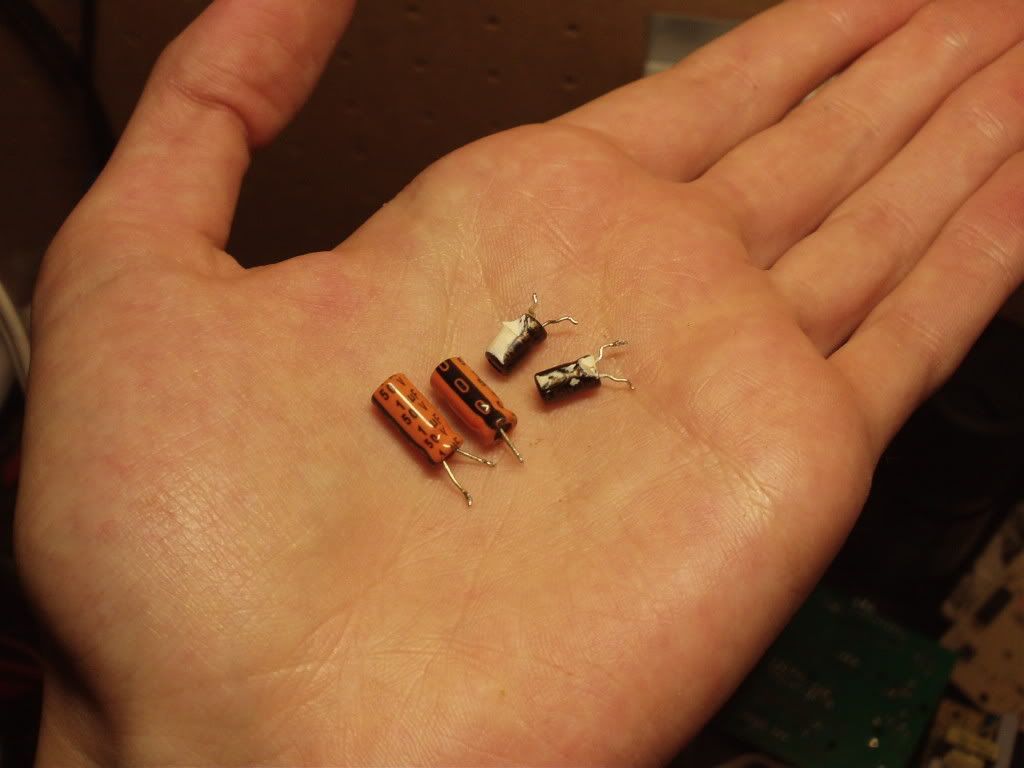
After the repair, I realized how undersized the caps were! Here are the original caps (in black) with two replacement caps like those I installed (in orange). They are the same, 1uF 50V, yet the original caps are much smaller!
Note that this isn't my new main computer XD. That's a backup computer. Thanks to it I could store all my files safely when I had to format my main computer a few years ago. However I couldn't stand a CRT monitor anymore, even just to look for a file. This Seanix computer (built entirely with old parts, from scratch) now has this LG monitor. It is also a temporary monitor in case my Acer 22" 16:9 monitor would fail.
However this one had a more unusual behaviour. Video card as OK, but when I plugged power in, the screen would light for half a second, then go out. I first thought it compeltely went out, but after checking with a flashlight, only the CCFL backlights were out!
After taking apart the screen, there was no evidence of caps failure on the CCFL inverter part of the power supply. I still suspected the caps to be faulty, so I desoldered them and checked with the capacitance meter. Instead of the normal 1.0 uF, I read 0.80uF. That could explain why the lights would only stay on a fraction of a second. I extracted two electrically identical 1.0uF, 50V caps from a dead computer power supply and installed them.
I connected back the power supply board and screwed it in place, plugged the power in and voila! The backlight stayed on!
After the repair, I realized how undersized the caps were! Here are the original caps (in black) with two replacement caps like those I installed (in orange). They are the same, 1uF 50V, yet the original caps are much smaller!
Note that this isn't my new main computer XD. That's a backup computer. Thanks to it I could store all my files safely when I had to format my main computer a few years ago. However I couldn't stand a CRT monitor anymore, even just to look for a file. This Seanix computer (built entirely with old parts, from scratch) now has this LG monitor. It is also a temporary monitor in case my Acer 22" 16:9 monitor would fail.
Category Desktops / Miscellaneous
Species Unspecified / Any
Size 1280 x 960px
File Size 117.2 kB



Comments